
Customize Your Pumpkin in Carve a Pumpkin Roblox: Shop & Looks
Customize your Carve a Pumpkin Roblox look: Pumpkin Shop Body/Stems/Hats/Misc/Colors/Glow tabs, accessory sliders, and what we saw in October 2026 footage.
FAQ
How do you customize your pumpkin in Carve a Pumpkin Roblox?
What does each Pumpkin Shop tab change?
What do Free Reward, Owned, and VIP Only mean on shop cards?
How does the accessory editor work in Carve a Pumpkin?
What is the difference between Colors and Glow?
Can you get hats and glow from Playtime Rewards?
How do you change how a pumpkin looks in Carve a Pumpkin on Roblox?
Look customization in the footage we reviewed is separate from carving (cutting holes with the knife tools). Players could open a Pumpkin Shop panel from the left-side icons during a round, pick a tab, then buy or equip Body shapes, Stems, Hats, Misc props, Colors, and Glow cards. A second in-round layout lists Pumpkin Shape, Stem, Colors, Hats, and Misc in vertical strips and opens an accessory editor with Position, Rotate, and Scale when a prop is active.
This page stays on what each category changes on the pumpkin and what we saw after items were applied. For Coin and Star prices, payout floats, and the full Playtime grid as an economy feature, use Coins, Stars, and shop. For cutting and tools, see how to carve in Carve a Pumpkin when that guide is live—we only link it here so the topics do not overlap.
What does the Pumpkin Shop panel look like, and what are the six tabs for?
In KawaiiCreeper’s video the centered panel is titled Pumpkin Shop with a close X. A vertical tab list on the left reads Body, Stems, Hats, Misc, Colors, and Glow. Each tab scrolls; we only captured the first visible cards at full resolution.
Body changes the pumpkin’s silhouette—round Classic, tall Gourd, ear-like Eerie (VIP Only in this frame), and paid shapes such as Long, Lopsided, and Pancake at 500 Coins each in the same session (prices match Coins, Stars, and shop).
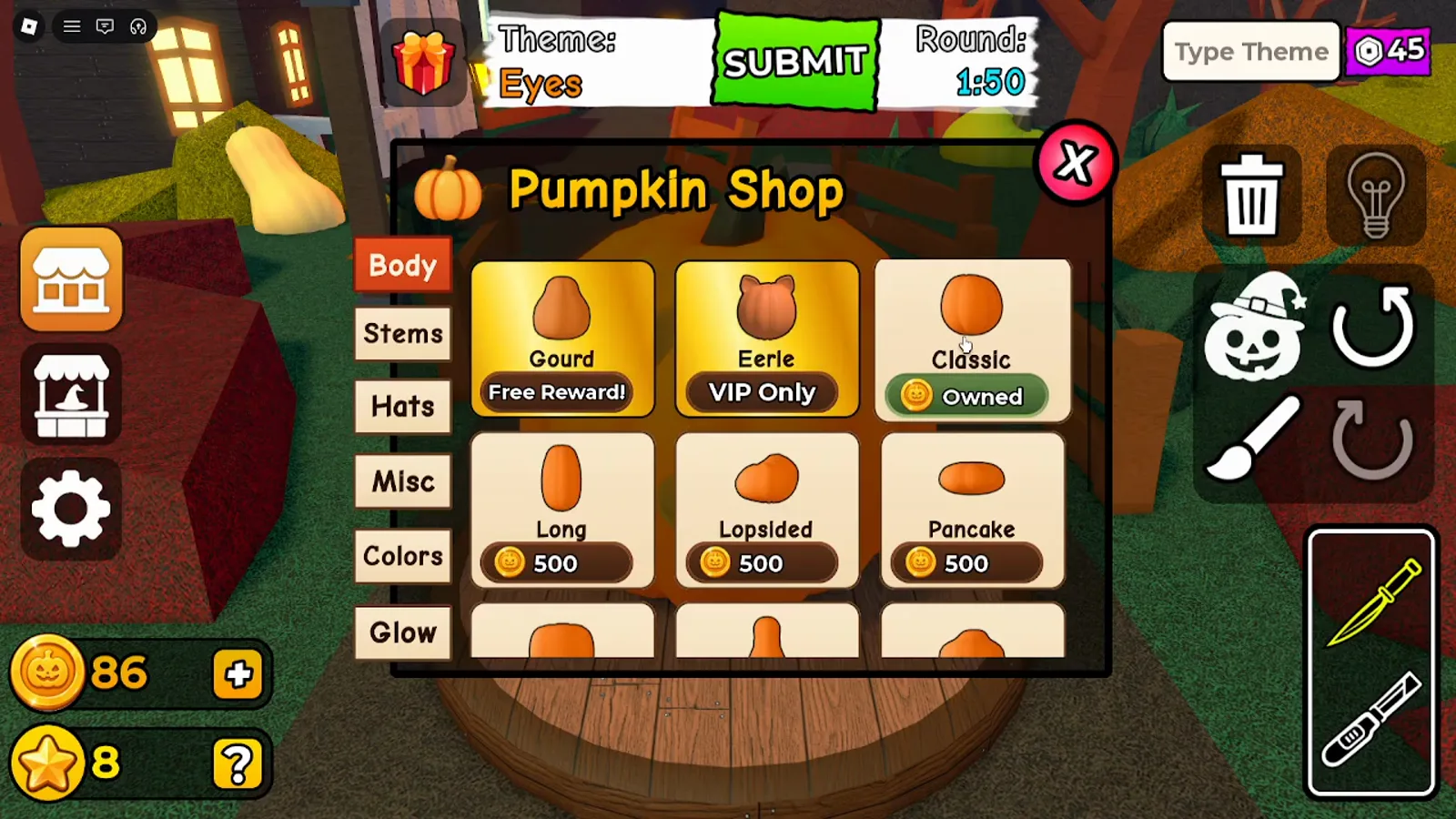
~5:24 in KawaiiCreeper’s video (gw8giYWu3Ss): Body tab with Gourd — Free Reward!, Eerie — VIP Only, Classic — Owned, and 500-Coin body cards.
Stems replace the stalk on top—Arch — Free Reward!, Default — Owned, and stem styles such as Bending, Branch, Corkscrew, and Crooked at 250 Coins in the row we read.
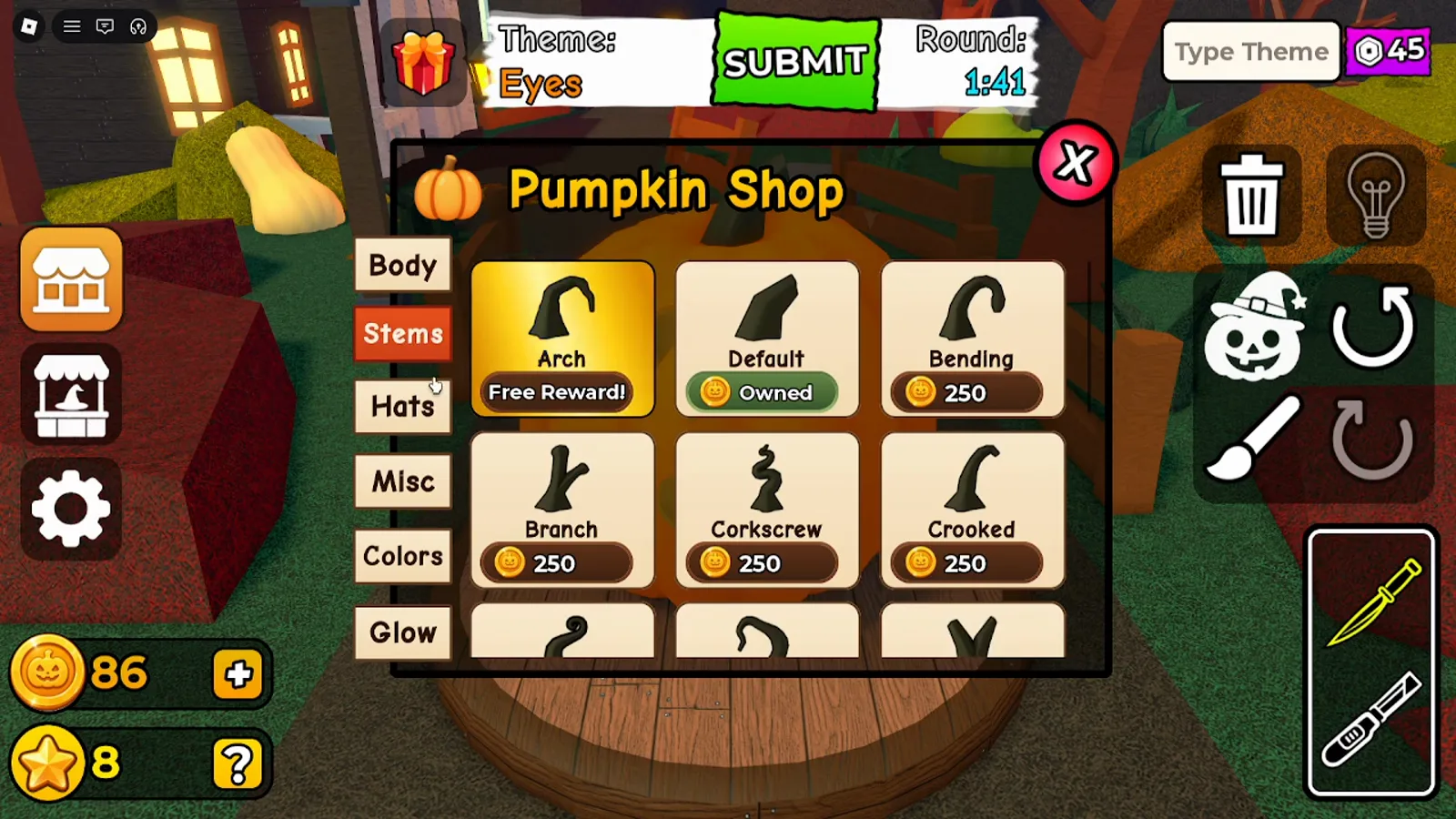
~5:33, Stems tab in the same shop visit.
Hats and Misc add 3D props above or on the pumpkin surface. The economy page already shows the Hats row (Pot Hat — Free Reward!, VIP Only crowns, Straw Hat — Owned, 1,000-Coin horns) and Misc row (Clown Nose — Free Reward!, Ghost — VIP Only, BOO! — Owned, 500-Coin stitches). This guide adds on-pumpkin screenshots below instead of repeating those grids.
Colors recolor the skin. The shop row we read lists Default — Owned and Ivory, Sage, Forest, Gold, Rose at 250 Coins; a purchase confirm Would you like to buy Sage? appeared in the other video (see economy page). Glow is a separate tab: three cards Purple Glow, Blue Glow, and Green Glow at 90 each using the purple hex icon (same icon family as Type Theme on the HUD—not the orange Coin icon).
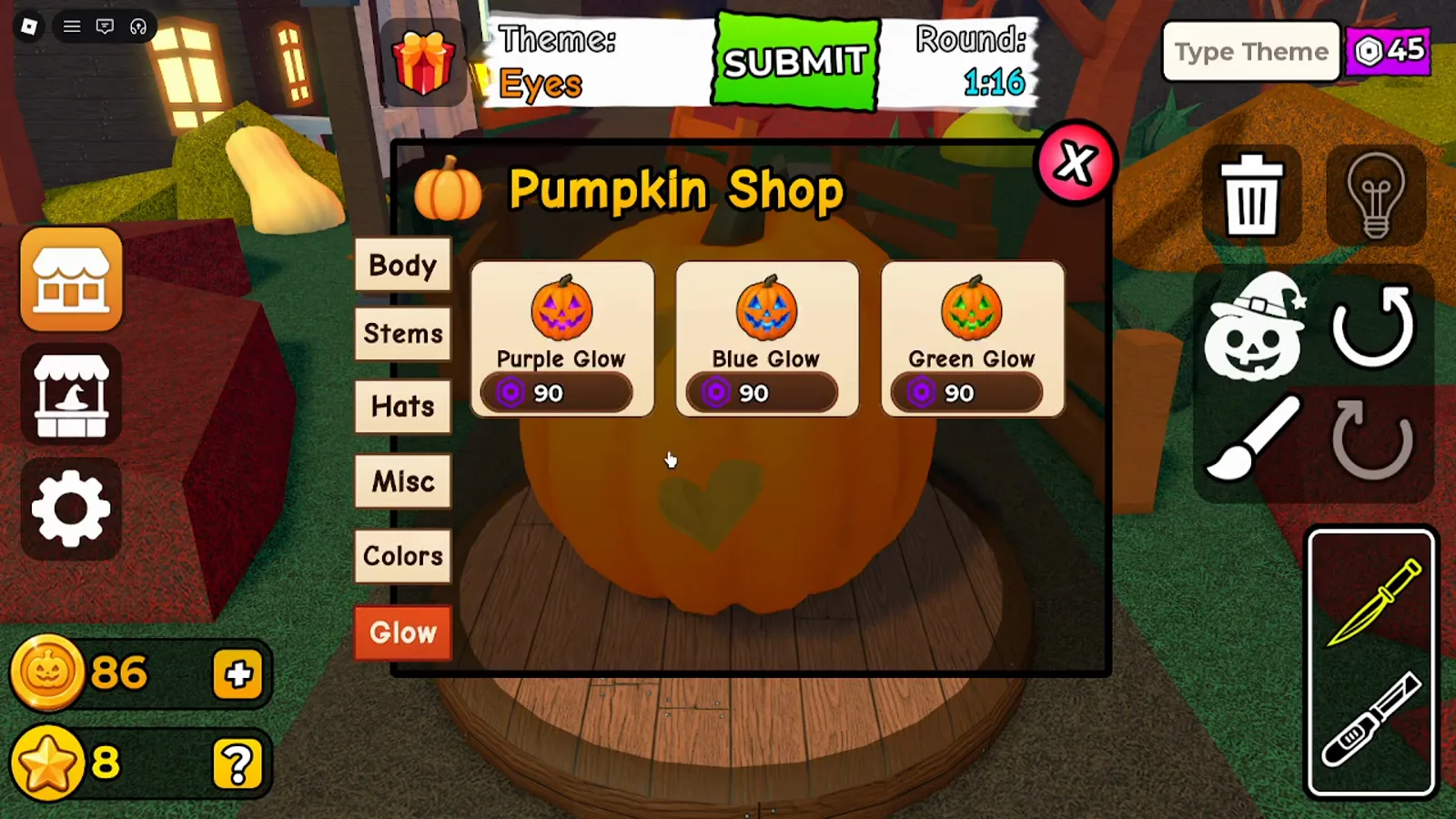
~5:58, Glow tab in KawaiiCreeper’s shop sequence.
| Tab | What it changes on the pumpkin (in our footage) | Card states we read |
|---|---|---|
| Body | Overall shape / silhouette | Free Reward! (Gourd), VIP Only (Eerie), Owned (Classic), 500 Coins (Long, Lopsided, Pancake) |
| Stems | Top stem model | Free Reward! (Arch), Owned (Default), 250 Coins (Bending, Branch, Corkscrew, Crooked) |
| Hats | Hat mesh on top | Free Reward!, VIP Only, Owned, 1,000 Coins (see economy page for names) |
| Misc | Signs, spider, tongue, stitches | Free Reward!, VIP Only, Owned (BOO!), 500 Coins stitches (see economy page) |
| Colors | Outer skin tint | Owned (Default), 250 Coins swatches (Ivory, Sage, Forest, Gold, Rose) |
| Glow | Inner light color through carvings | 90 purple-icon price on Purple / Blue / Green Glow cards |
Verified = we saw the label or effect on screen in these two videos. Complete catalogs, hidden items, and refresh rules remain Not yet verified .
How does the in-round accessory menu differ from the Pumpkin Shop?
Opening customization during a carve (without the full shop grid) shows category strips rather than the six shop tabs. In Andre’s Fire round (~9:20, WRXWjjoXVlo) we read:
- Pumpkin Shape (1/10) with Classic selected
- Stem (1/17) with Default selected
- Colors (1/8) with Default orange selected
- Hats (3/12) with None, plus icons for Straw Hat and Witch Hat in the strip
- Misc (3/10) with Spider selected (also None and BOO! icons visible)
The accessory editor sits bottom-right with orange tabs Position, Rotate, and Scale. With Spider active, Position showed X 0.62, Y 0.50, Z 0.50 while Andre resized the spider into a flame-shaped mouth. Andre’s auto-translated captions around 9:14 say he will make the spider bigger and rotate it—consistent with the Scale / Rotate tabs on screen, not a separate rules source.
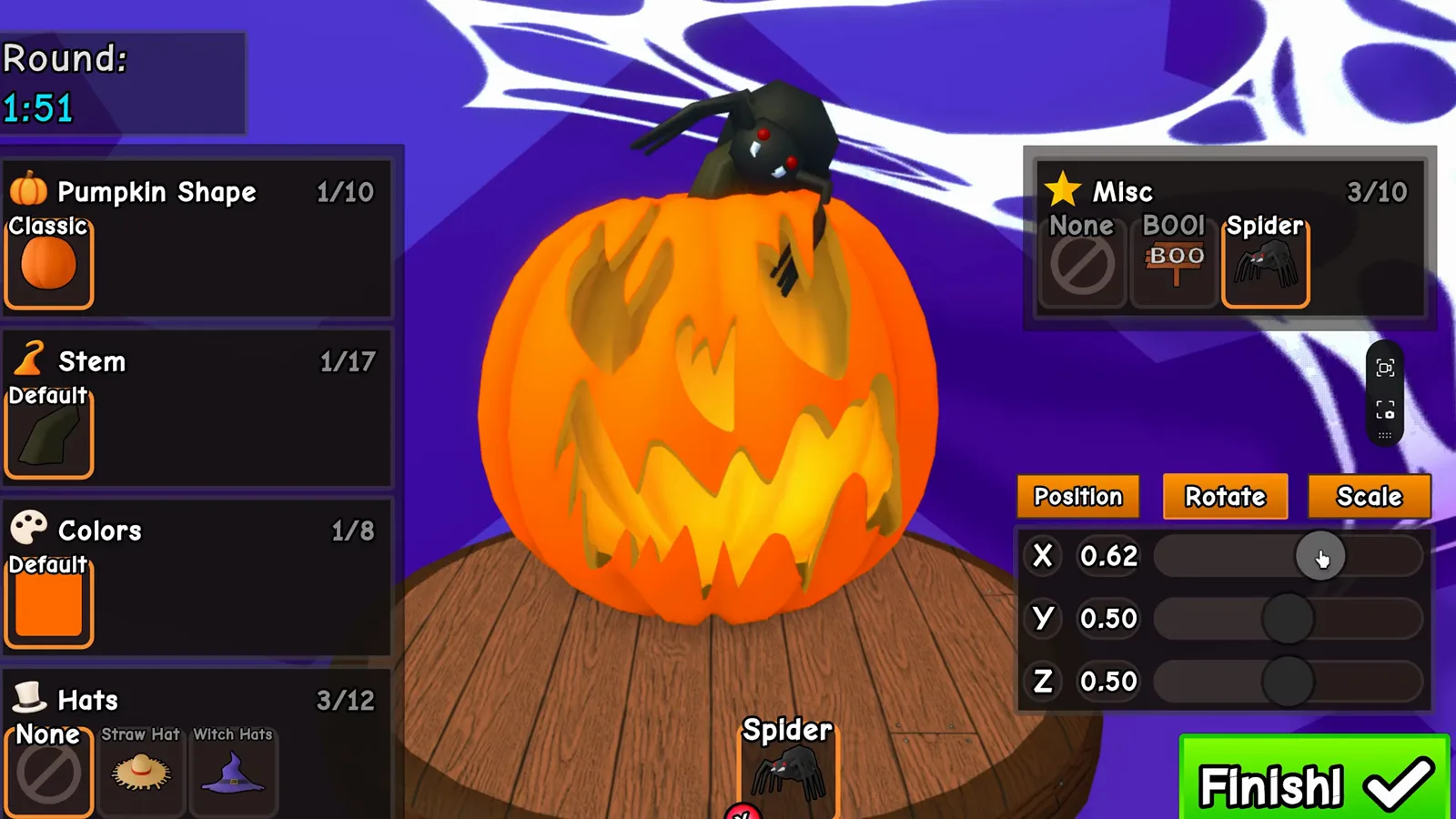
Spider placement during the Fire theme in Andre’s video (~9:20).
During Scary, Andre placed the BOO! misc sign behind the stem and opened the Scale tab with the slider at 0.71, with Misc highlighting BOO! and Finish! visible.
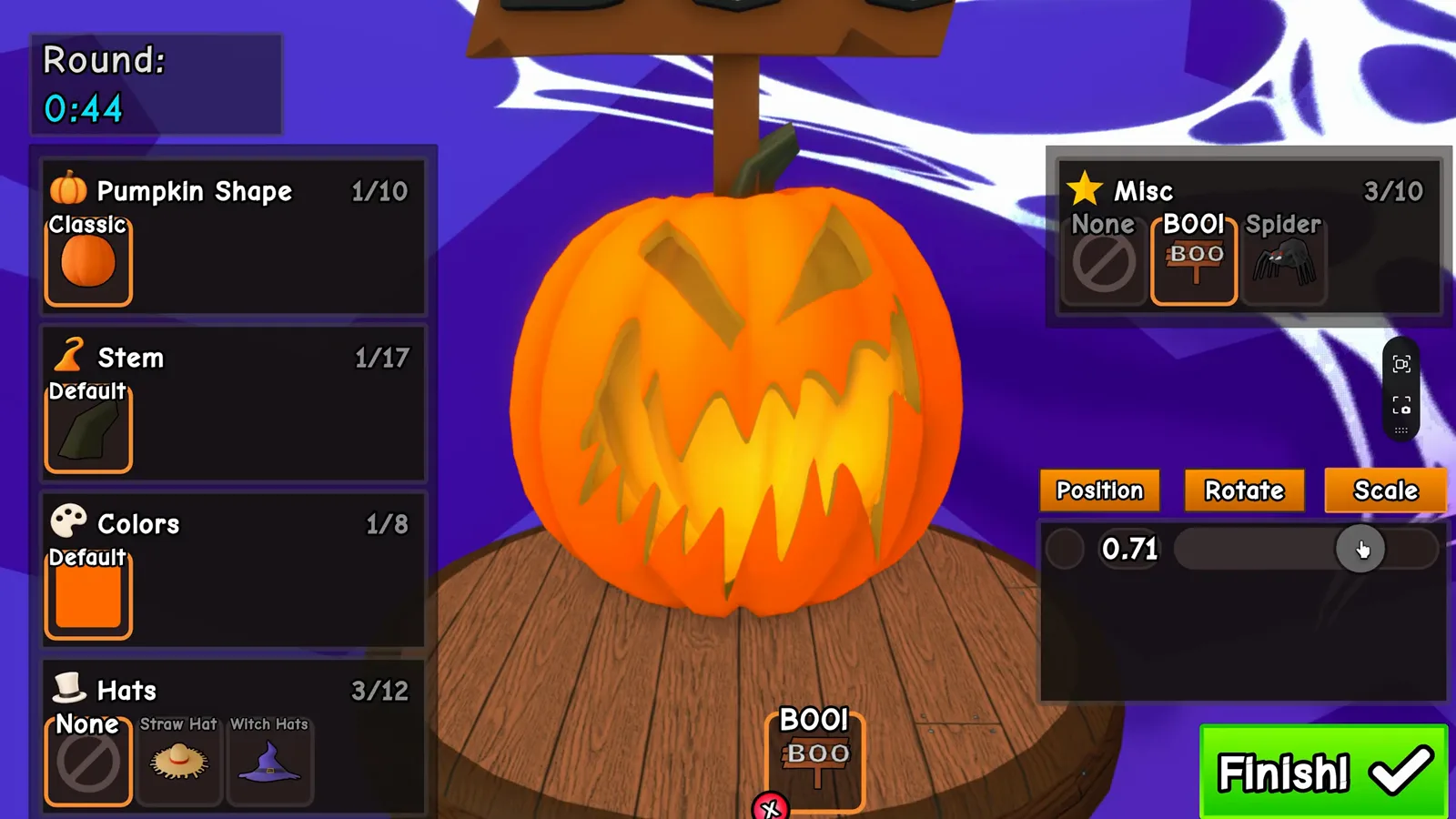
~5:56, Scary round: BOO! selected in Misc with Scale adjustment.
The coins page shows a Position-only spider frame from the same video; here we kept Rotate / Scale and Misc selection so the images are not duplicates.
What do Colors and Glow look like after you apply them?
Colors tint the outer shell. In KawaiiCreeper’s second Scary pass (~27:38, gw8giYWu3Ss) the pumpkin skin reads light green (the shop swatch name Sage appears in the economy capture). Triangle eyes and a jagged mouth were carved afterward; the interior light through those holes stayed warm orange, not green—so in this clip color and inner glow behaved independently.
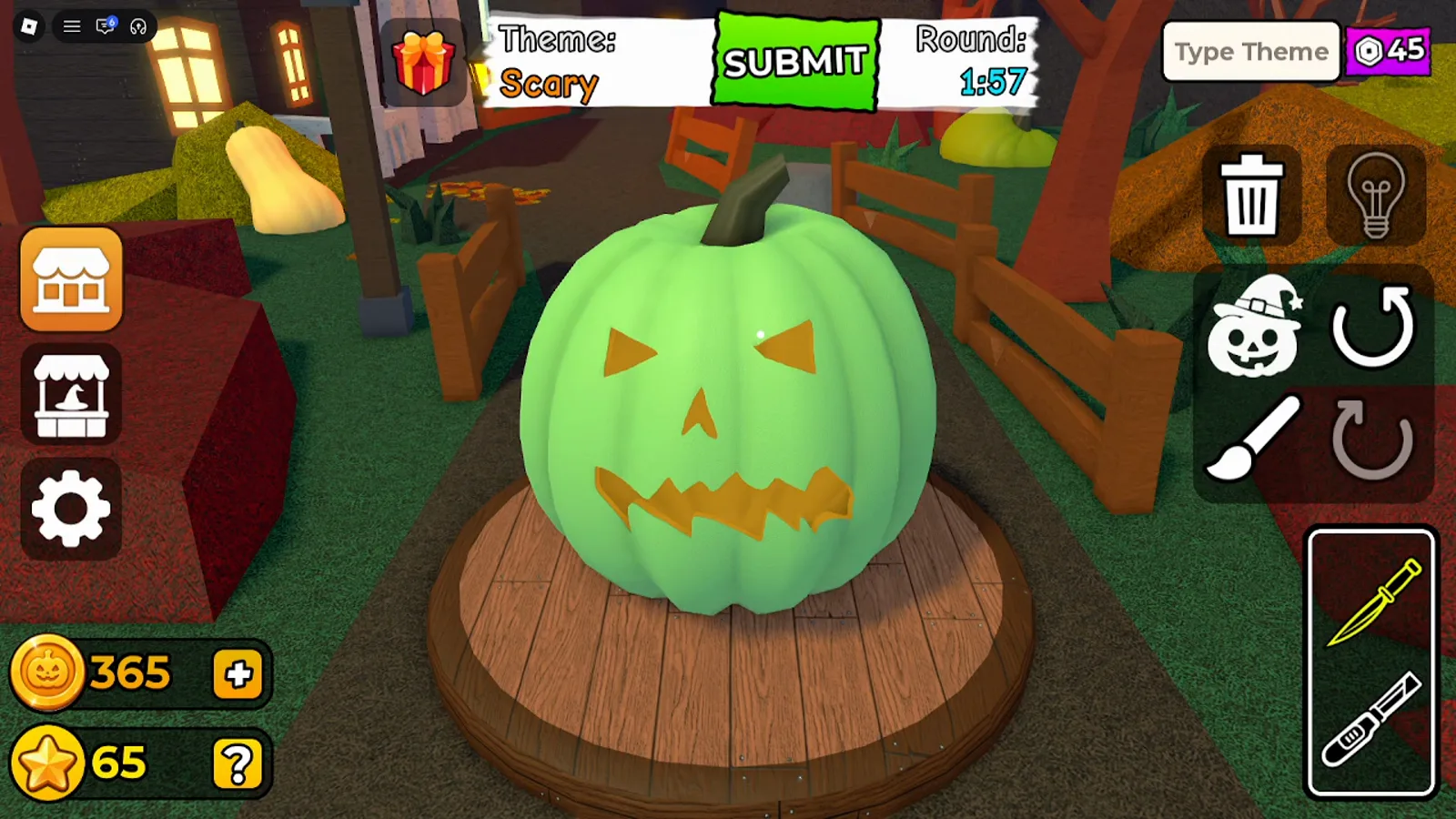
Sage-colored skin with default-looking interior glow during Scary.
Glow cards in the shop change the light color inside holes (Purple / Blue / Green at 90 with the purple icon). We did not capture a clear before/after purple-or-green glow swap on the same pumpkin in these exports. Playtime Rewards does show a Green Glow preview icon (jack-o’-lantern with green light) on a timer—see the next section. Default orange-yellow voting shots (for example Andre’s Scary submit at ~6:05) show the usual lit carve but do not prove which Glow item—if any—was equipped.
Which hats and misc items did players actually wear in these videos?
| Item | Where we saw it | Effect on the pumpkin |
|---|---|---|
| Straw Hat (wide brim; sombrero-style in frame) | KawaiiCreeper, in-round Hats tab ~20:00 | Sits on a Classic jack-o’-lantern face with Position sliders at default 0.50 while Round: 1:10 still runs |
| BOO! sign | Andre, Scary ~5:56 | Wooden BOO! prop behind the stem on a jagged-face orange pumpkin |
| Spider | Andre, Fire ~9:28 close-up; KawaiiCreeper Playtime grid | Black spider with red eyes perched on carved surface / listed as timed reward |
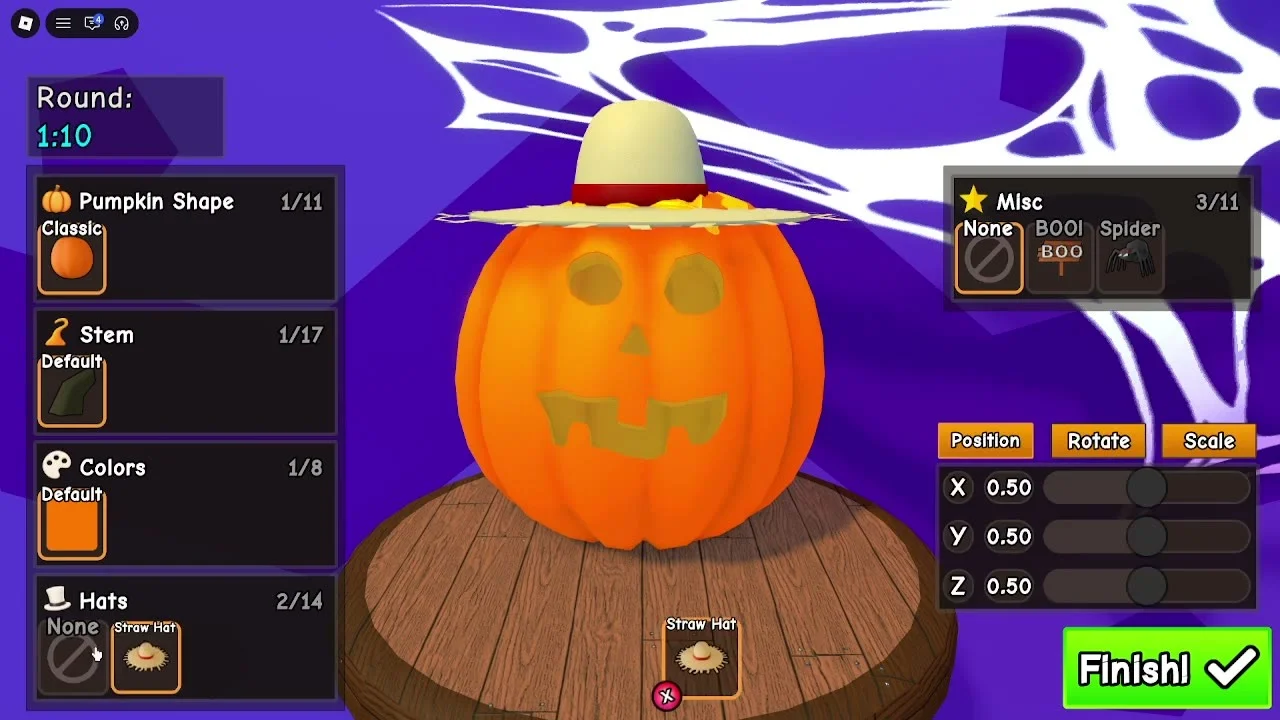
~20:00 (gw8giYWu3Ss): Straw Hat on a carved Classic body—Hats (2/14) selected, Misc still None.
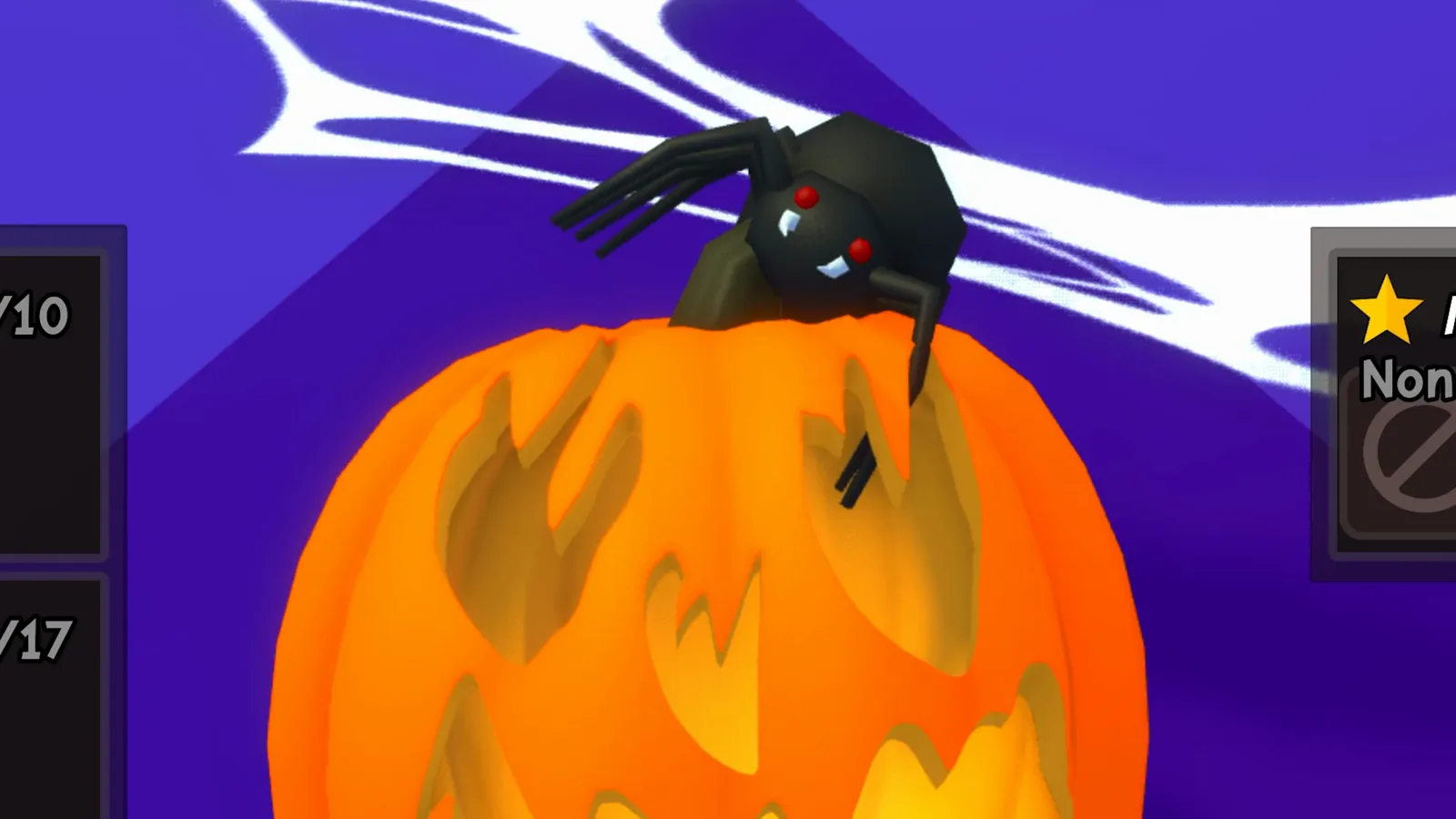
Close view of the Spider on a Fire-theme mouth (~9:28, Andre).
Andre’s narrator also mentions a “boo” accessory on Nightmare and Scary in the transcript; the BOO! misc sign above is the clearest misc match we exported. Themes pages note straw hats, spiders, and boo props in theme rounds—this page confirms the item names tied to those props.
What cosmetic items show up in Playtime Rewards?
Opening the gift-box icon shows Playtime Rewards with eight slots. KawaiiCreeper’s ~6:02 frame lists:
+50 Coins (Claimed!), Spider (3m 51s), +75 Coins, Witch Hat, Corkscrew, +250 Coins, Tongue, and Green Glow (preview pumpkin with green inner light)—each later slot on a longer timer.
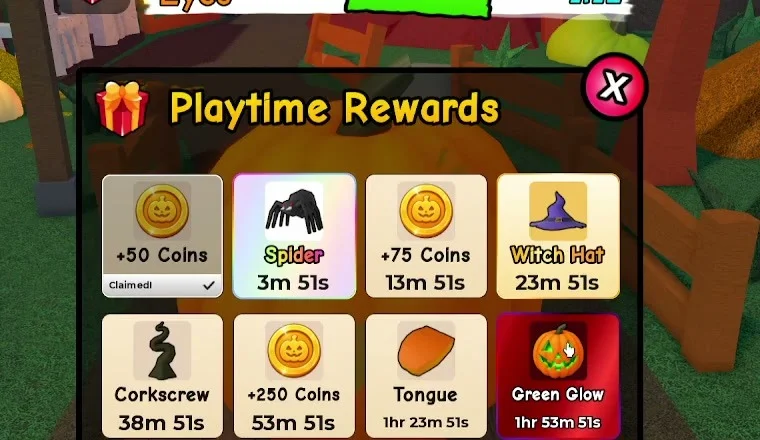
~6:02 (gw8giYWu3Ss): cropped Playtime Rewards panel—+50 Coins Claimed!, Spider 3m 51s, through Green Glow 1hr 53m 51s (same eight-slot order as the economy page).
Andre’s ~2:39 frame (also described on the economy page) shows +50 Coins, Spider, and +75 Coins marked Claimed! with Witch Hat counting down—evidence that the same cosmetic names appear for another account. Whether Playtime unlocks bypass shop prices is not yet verified.
What did other players’ pumpkins wear during voting?
During Alien in KawaiiCreeper’s session, the Winners podium (~44:00) showed three carved pumpkins with different face reads and the usual orange interior glow. Player nameplates and chat text are heavily blurred in our export; we do not quote those usernames. None of the three podium pumpkins wore a visible shop hat in that frame—they emphasize shape + carving + default glow, not paid props. (The Eyes round at ~8:08 in the same video showed the same pattern; we use Alien here so this screenshot is not shared with the coins and shop Eyes podium frame.)
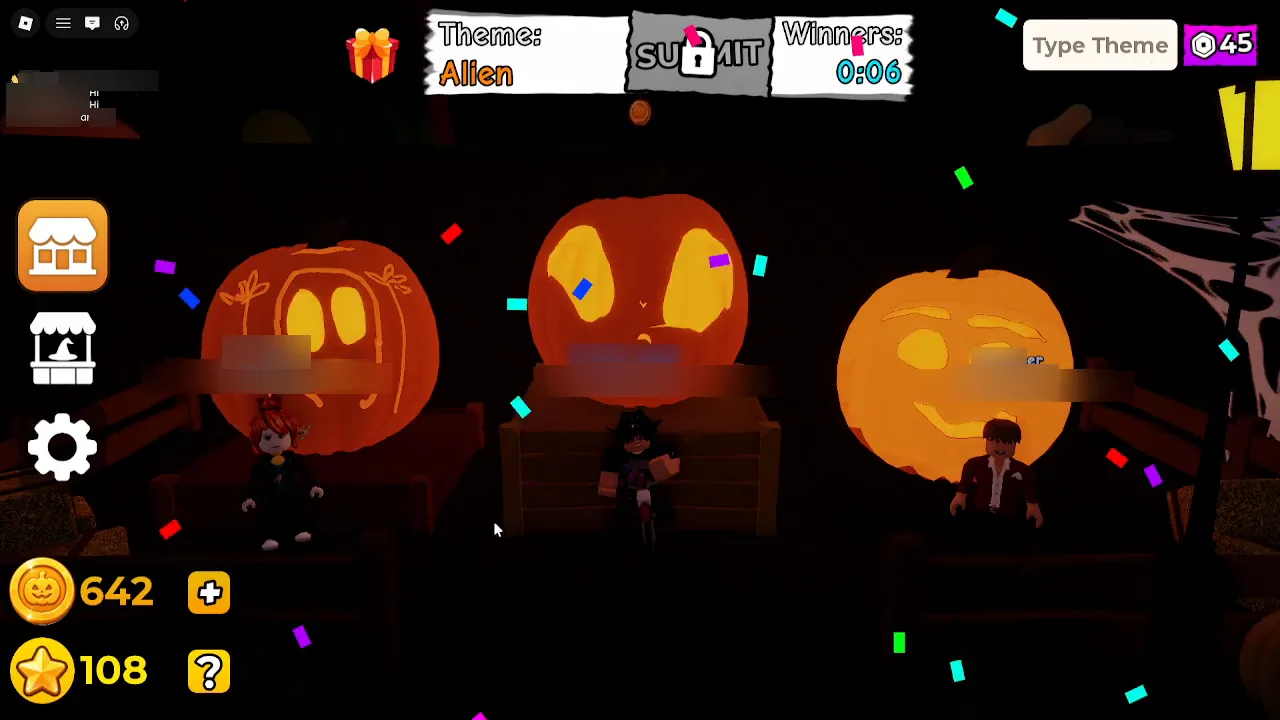
~44:00 (gw8giYWu3Ss): Alien winners (Winners: 0:06); name and chat areas blurred.
For broader voting UI (stars, timers), see voting and results. For how props interact with Theme: labels, see themes.
Our suggestions (not game mechanics)
- Pick one “hero” prop per round (one hat or one misc) so silhouettes stay readable during fast voting pans.
- Set Color before detailed carving if you want a colored skin—the Sage round shows carvings read clearly on green.
- Use Position / Scale on misc signs and spiders so props sit inside the silhouette, as Andre did with the BOO! sign and Spider.
- Check Playtime timers between rounds for Spider, Witch Hat, or Green Glow if you are grinding cosmetics without spending Coins (economy page).
Where should I go next on this wiki?
- Coins, Stars, and shop — prices, VIP banners, Free Reward popup steps, and Coin/Star counters.
- Themes in Carve a Pumpkin Roblox — HUD Theme: prompts and sample prop pairings.
- How to play Carve a Pumpkin! — carve → vote → earn loop.
- Beginner guide — first sessions and checklist.
- How to carve in Carve a Pumpkin — knife tools and cutting (carving guide; link reserved for the parallel carving page).
Where do these observations come from?
| Source | Channel | Upload date | Language | How we used it |
|---|---|---|---|---|
| gw8giYWu3Ss | KawaiiCreeper | 2026-10-11 | English audio; no reliable captions | Pumpkin Shop Body/Stems/Glow tabs, Sage skin, Playtime grid, Straw Hat on-pumpkin, Alien winners podium |
| WRXWjjoXVlo | Andre se hace Gamer | 2026-10-10 | Spanish audio; auto-translated English captions (clues only) | Accessory editor, BOO! sign, Spider on Fire carving |
Screenshots are illustrative references from third-party gameplay; other players’ name tags are blurred where noted. Prose is original to carveapumpkinguide.wiki. We have not independently unlocked every item as of 2026-10-12.

Carve a Pumpkin Roblox gameplay showing Pumpkin Shop tabs and accessory editor (KawaiiCreeper)
What is still not verified?
| Topic | Notes |
|---|---|
| Full item catalog per tab | Only first visible rows exported; scrolling lists may hide more cards. |
| Rarity, rotation, and duplicate rules | No official source; Playtime vs shop overlap unknown. |
| Purple-icon Glow currency name | Same icon as Type Theme counter; not confirmed as a spendable currency name. |
| VIP Only unlock path | Banners seen; Roblox game passes list was empty on 2026-10-11 per game info. |
| Whether Colors affect glow color | Sage skin + orange interior suggests separate channels; not exhaustively tested. |
| Free Reward grant per tab | Popup steps documented on economy page; exact item delivered not shown item-by-item here. |
Related Articles
guides
Carve a Pumpkin Roblox Coins, Stars and Shop: What We Saw
Carve a Pumpkin Roblox Coins and Stars from real rounds: results-screen payouts by place, Pumpkin Shop prices, Playtime Rewards and title labels, with limits.
guides
How to Carve a Pumpkin in Carve a Pumpkin! Roblox: Editor Controls
Carve a Pumpkin carving controls from gameplay footage: mouse cut paths, scroll zoom, SUBMIT and EDIT, knife tool, accessory Finish flow (touch unverified).
guides
What Wins in Carve a Pumpkin Roblox? First-Place Pumpkins We Saw
See what first-place pumpkins looked like in Carve a Pumpkin Roblox gameplay: podium winners by theme, readable carvings, and limits—scoring rules not verified.
Was this helpful?
Thanks for the feedback!