
Carve a Pumpkin Roblox Coins, Stars and Shop: What We Saw
Carve a Pumpkin Roblox Coins and Stars from real rounds: results-screen payouts by place, Pumpkin Shop prices, Playtime Rewards and title labels, with limits.
FAQ
Where are Coins and Stars shown in Carve a Pumpkin Roblox?
How do you get Stars in Carve a Pumpkin?
How do you get Coins in Carve a Pumpkin?
What is in the Pumpkin Shop?
What does VIP Only mean in the shop?
What are the rank titles above player names?
What do the Coins and Stars counters look like in Carve a Pumpkin Roblox?
In the footage we reviewed, both currencies use stacked bars in the bottom-left corner: Coins on top with a round coin icon, Stars underneath with a star icon, each showing a numeric total and a small square button—+ next to Coins and ? next to Stars. The same layout appears in KawaiiCreeper’s English-session capture (uploaded 2026-10-11) and Andre se hace Gamer’s session (uploaded 2026-10-10). What the + and ? buttons do is not yet verified; we never saw a tooltip or menu open from them in the frames we exported.
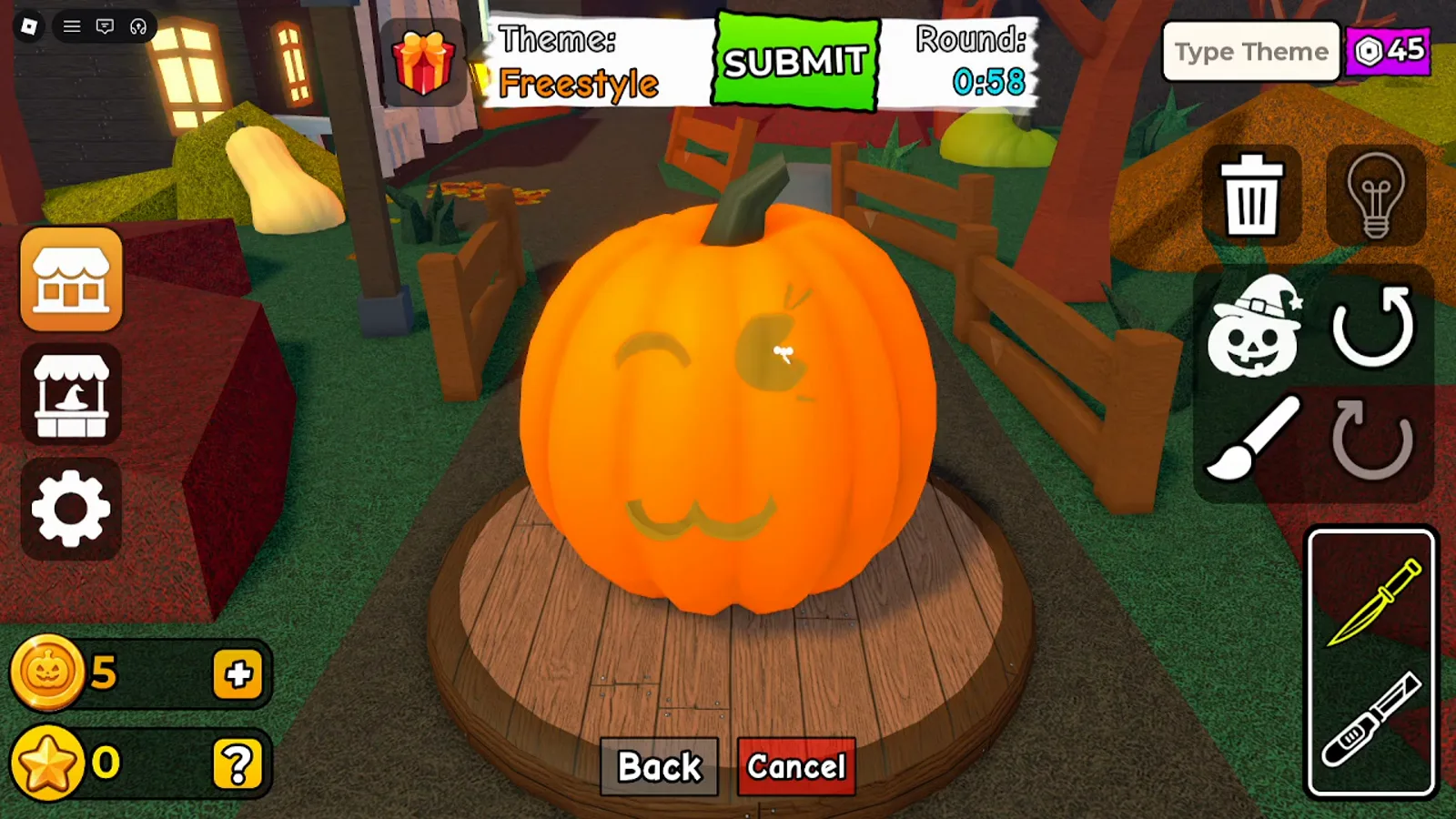
Early in KawaiiCreeper’s video (~120 s), the HUD reads 5 Coins and 0 Stars during a Freestyle carve.
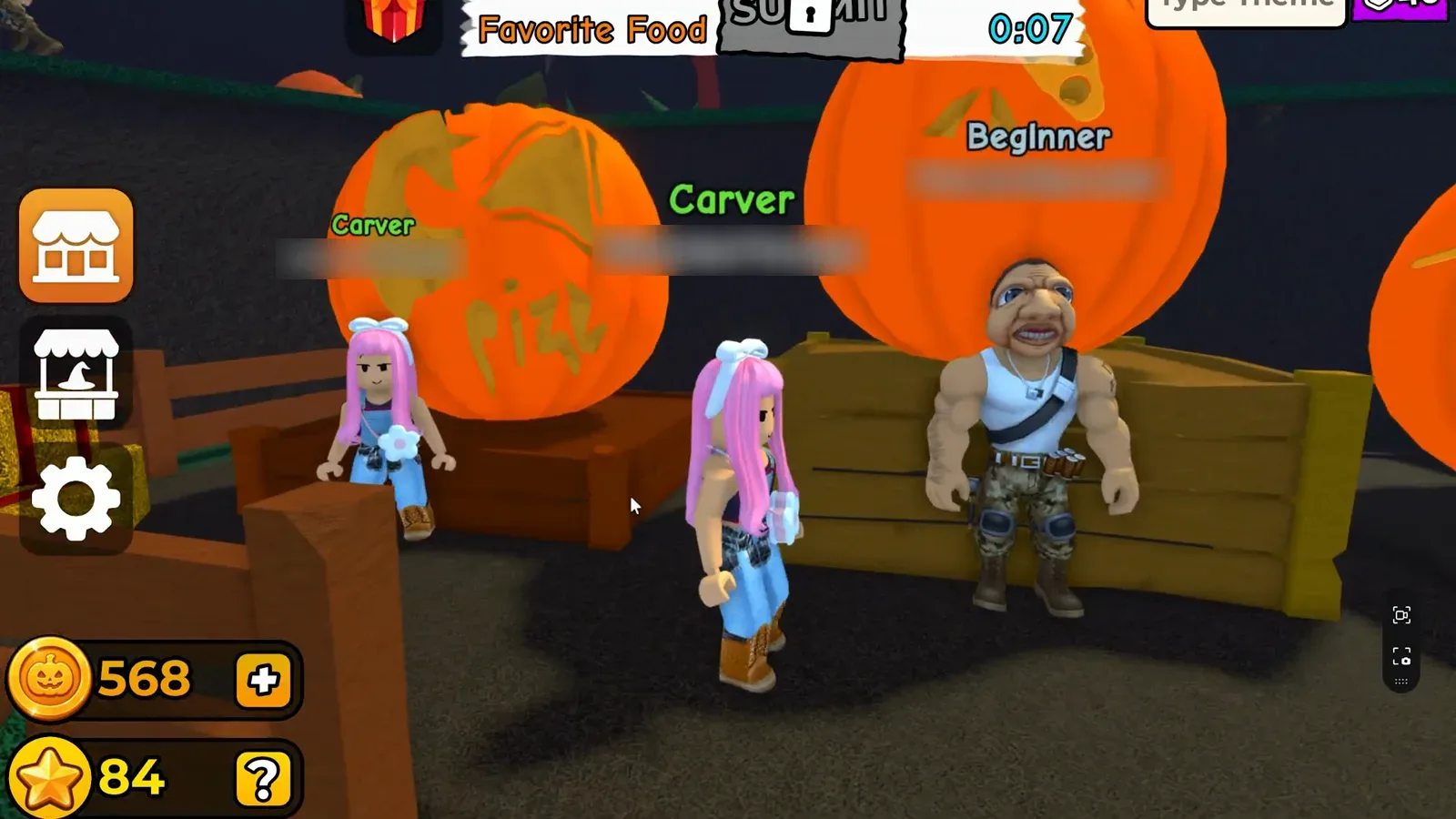
Later in Andre’s video (~320 s, right after the Favorite Food results), the same HUD shape shows 568 Coins and 84 Stars while players stand near carved pumpkins between rounds. Other players’ usernames are blurred.
Official copy still only states that you earn Stars and Coins and unlock items (how to play); treat any payout you read elsewhere as unverified until you see it in your own client.
How do Stars change after a round?
This is the clearest pattern in our footage. After voting, the game shows a Player Scores board (see voting and results). Each row has a rank, a name and a star total. In every round where we could read both the board and the recording player’s Stars counter, the counter rose by exactly the number on that player’s row:
| Round | Video, time | Recording player’s row | Stars before → after | Change |
|---|---|---|---|---|
| Nightmare | Andre, ~0:45 | #2, 14 | 34 → 48 | +14 |
| Mustache Face | Andre, ~2:33 | #2, 18 (tied with #1) | 48 → 66 | +18 |
| Favorite Food | Andre, ~5:12 | #2, 18 | 66 → 84 | +18 |
| Pirate | Andre, ~8:20 | #1, 15 (three-way tie) | 94 → 109 | +15 |
| Fire | Andre, ~11:05 | #3, 20 (tied with #2) | 109 → 129 | +20 |
| Devil | Andre, ~13:22 | #4, 18 | 129 → 147 | +18 |
| Eyes | KawaiiCreeper, ~8:16 | #5, 11 | 8 → 19 | +11 |
| Classic Halloween | KawaiiCreeper, ~22:09 | #1, 15 | 41 → 56 | +15 |
That is 8 of 8 readable rounds across two different accounts. Two rounds were left out because we could not read both numbers: the Scary round in Andre’s video (Stars went 84 → 94 with no board frame) and KawaiiCreeper’s first Freestyle round (0 → 8). How the board number itself is calculated is not yet verified.
How do Coins change after a round?
Coins also jump at the results screen, and the game shows the size of the jump itself: a small gold float such as +95 rises above the Coins bar as the podium appears. We read three of those floats directly (+95 in Nightmare and in Favorite Food, +70 in Fire) and a fourth, +20 in Devil, as it was fading. In the other four rounds a jump cut hid the float, so the table uses the difference between the last Coins reading in the voting phase and the first reading on or after the results screen. Those differences can include a coin or two from voting ticks.
| Round | Video | Rank on board | Coins before → after | Change | How we read it |
|---|---|---|---|---|---|
| Pirate | Andre | #1 (three-way tie) | 606 → 726 | +120 | difference (float hidden by a cut) |
| Classic Halloween | KawaiiCreeper | #1 | 302 → 424 | +122 | difference (float hidden by a cut) |
| Nightmare | Andre | #2 | 186 → 281 | +95 | float on screen |
| Mustache Face | Andre | #2 (tied with #1) | 287 → 382 | +95 | difference (float hidden by a cut) |
| Favorite Food | Andre | #2 | 466 → 564 | +95 | float on screen; voting ticks added a few coins after the 466 reading |
| Fire | Andre | #3 (tied with #2) | 753 → 823 | +70 | float on screen |
| Devil | Andre | #4 | …38 → …58 | +20 | float on screen; the hundreds digit is clipped by the screen edge |
| Eyes | KawaiiCreeper | #5 | 89 → 109 | +20 | difference (float hidden by a cut) |
Observation (these 8 rounds only): the jump followed the rank on the Player Scores board every time: about +120 for first place (twice), +95 for second (three times), +70 for third, and +20 for fourth and fifth. We never saw sixth place or below. Andre also says out loud that he finished second in Favorite Food and third in Fire, and fourth in Devil. Take a “before” reading early in a round with care: Andre’s counter read 164 at the start of his video and 186 once voting began, with no results screen in between, so a reading from the carve phase would overstate the payout. The official payout table is not yet verified; this is a small sample from two sessions.
Other Coin movements we saw in the same footage:
- Playtime Rewards claims. Andre’s frame near 2:39 shows a +75 float and the counter at 457 (it read 382 on the board a few seconds earlier), with the +75 Coins reward card marked Claimed! KawaiiCreeper’s Coins went from 36 to 86 between about 5:00 and 6:00 around the first +50 Coins claim. Andre’s narrator says he “won 75 coins” right after a tied result, but the matching frame shows the Playtime +75 claim, so we do not treat 75 as a placement payout.
- Voting. During Favorite Food voting in Andre’s video, Coins read 459, then 461, 464 and 466 across successive pumpkins while Stars stayed at 66. In KawaiiCreeper’s video Coins went from 86 to 89 during an Eyes voting phase. What triggers each tick is not yet verified.
- Ground pickups. KawaiiCreeper’s hub frame below shows a +1 float beside a gold coin on the grass. Andre’s narrator remarks that other players had “already beat me to it” when he went to collect coins, which suggests ground coins are shared. That is a player remark, not a verified rule.
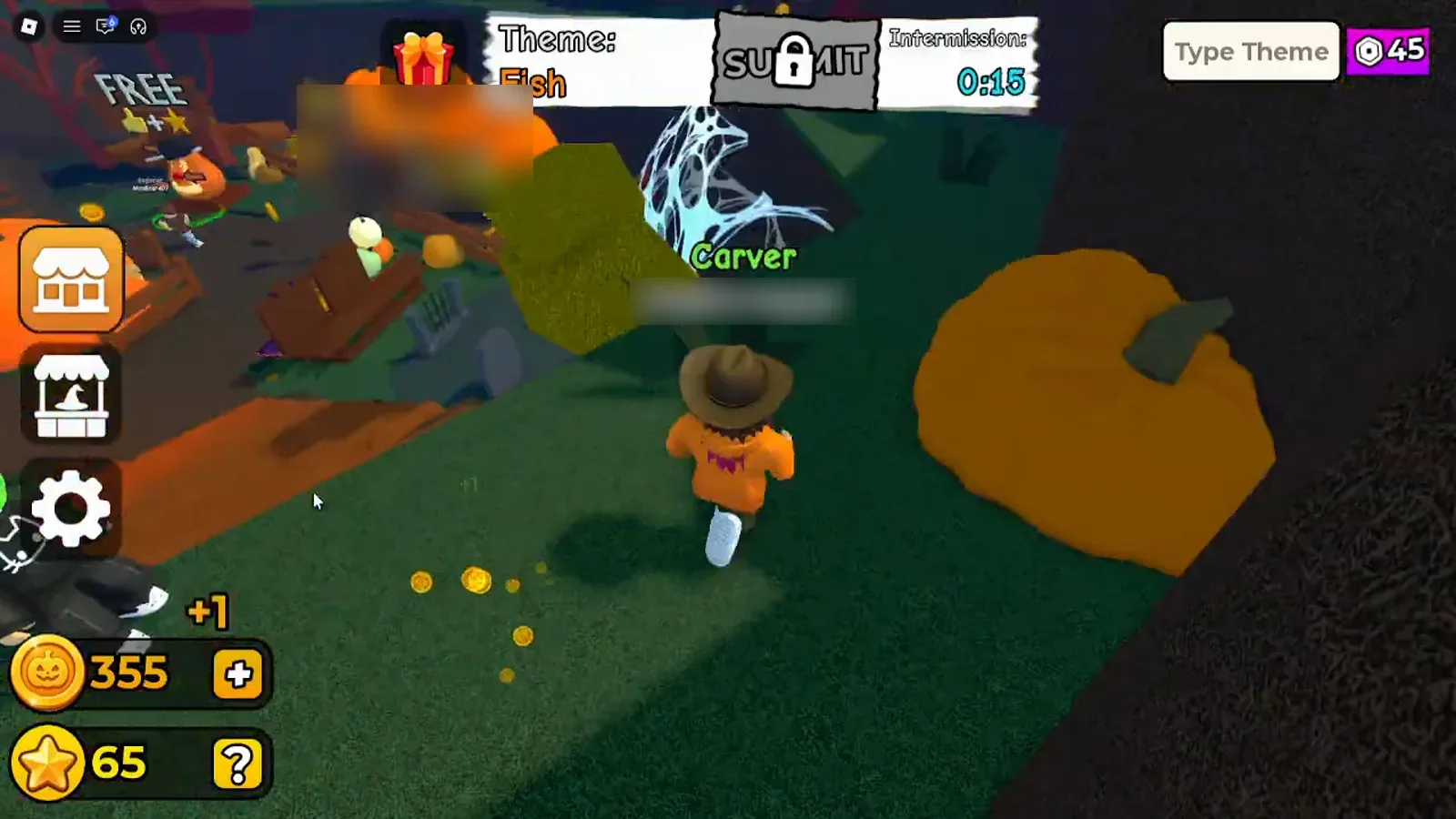
KawaiiCreeper’s hub frame at ~26:20 (Intermission 0:15 after the Fish round): +1 by a ground coin, 355 Coins on the HUD, and the green nameplate word Carver above the avatar.
For the wider loop around these numbers, see game info.
What is inside the Pumpkin Shop panel?
KawaiiCreeper opens a centered panel titled Pumpkin Shop with a close X. A vertical tab list on the left runs Body, Stems, Hats, Misc, Colors, Glow. We read the first visible rows of each tab at full resolution; every tab scrolls, so there are more cards below than we list.
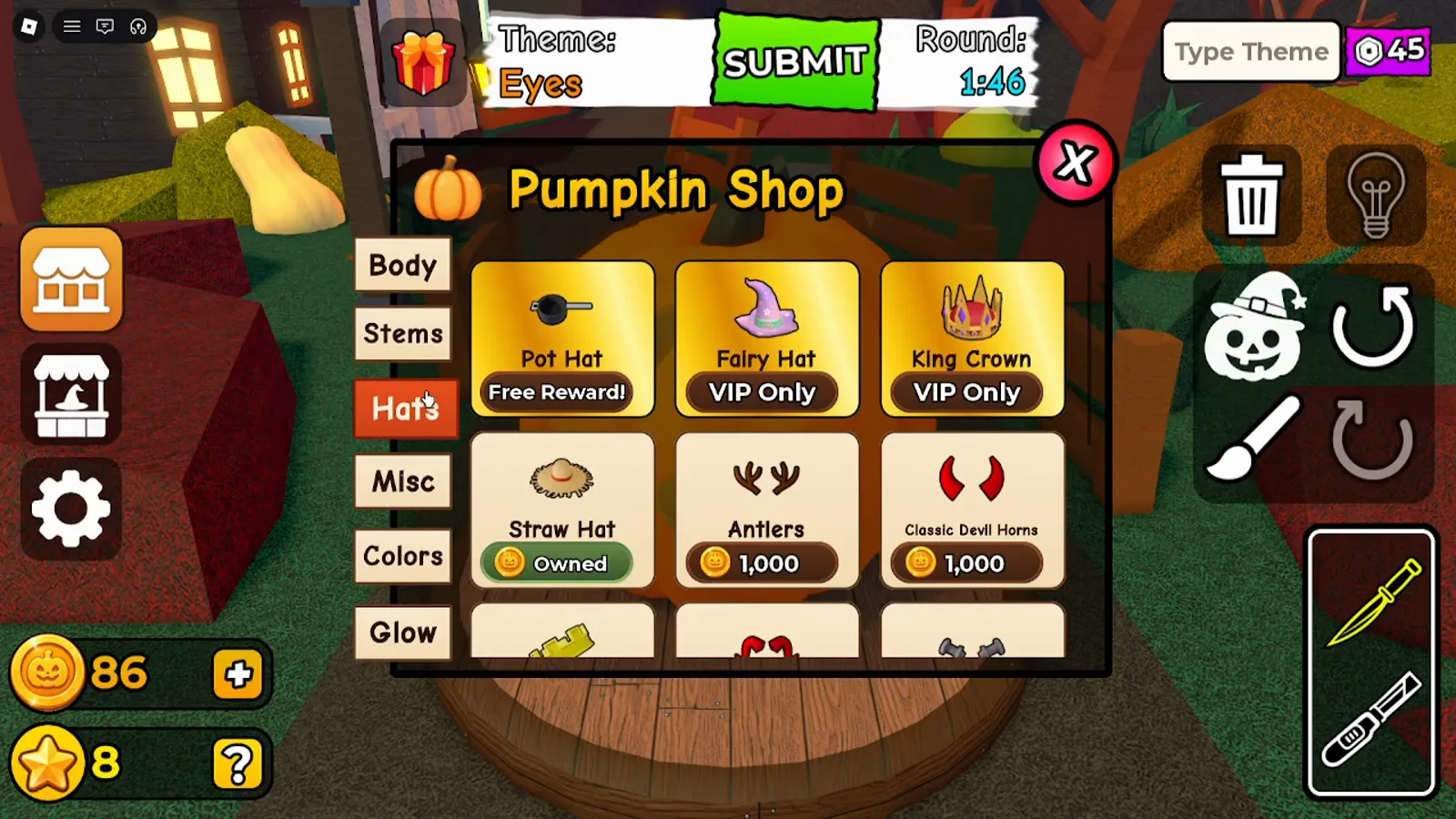
~5:28, Hats tab: Pot Hat shows Free Reward!, Fairy Hat and King Crown show VIP Only, Straw Hat is Owned, Antlers and Classic Devil Horns are 1,000 Coins each.
| Tab | First visible cards (name, label or price) |
|---|---|
| Body | Gourd Free Reward!; Eerie VIP Only; Classic Owned; Long, Lopsided, Pancake at 500 Coins each. |
| Stems | Arch Free Reward!; Default Owned; Bending, Branch, Corkscrew, Crooked at 250 Coins each. |
| Hats | Pot Hat Free Reward!; Fairy Hat VIP Only; King Crown VIP Only; Straw Hat Owned; Antlers 1,000; Classic Devil Horns 1,000. |
| Misc | Clown Nose Free Reward!; Ghost VIP Only; BOO! Owned; Curving Tongue, Long Stitch, Short Stitch at 500 Coins each. A Spider card is partly visible in the third row. |
| Colors | Default Owned; Ivory, Sage, Forest, Gold, Rose at 250 Coins each. A purchase prompt reads “Would you like to buy Sage?” with 250, Yes and No buttons. |
| Glow | Purple Glow, Blue Glow, Green Glow at 90 each. The price uses a purple icon, the same icon that sits beside the Type Theme box, not the orange Coin icon. What that currency is is not yet verified. |
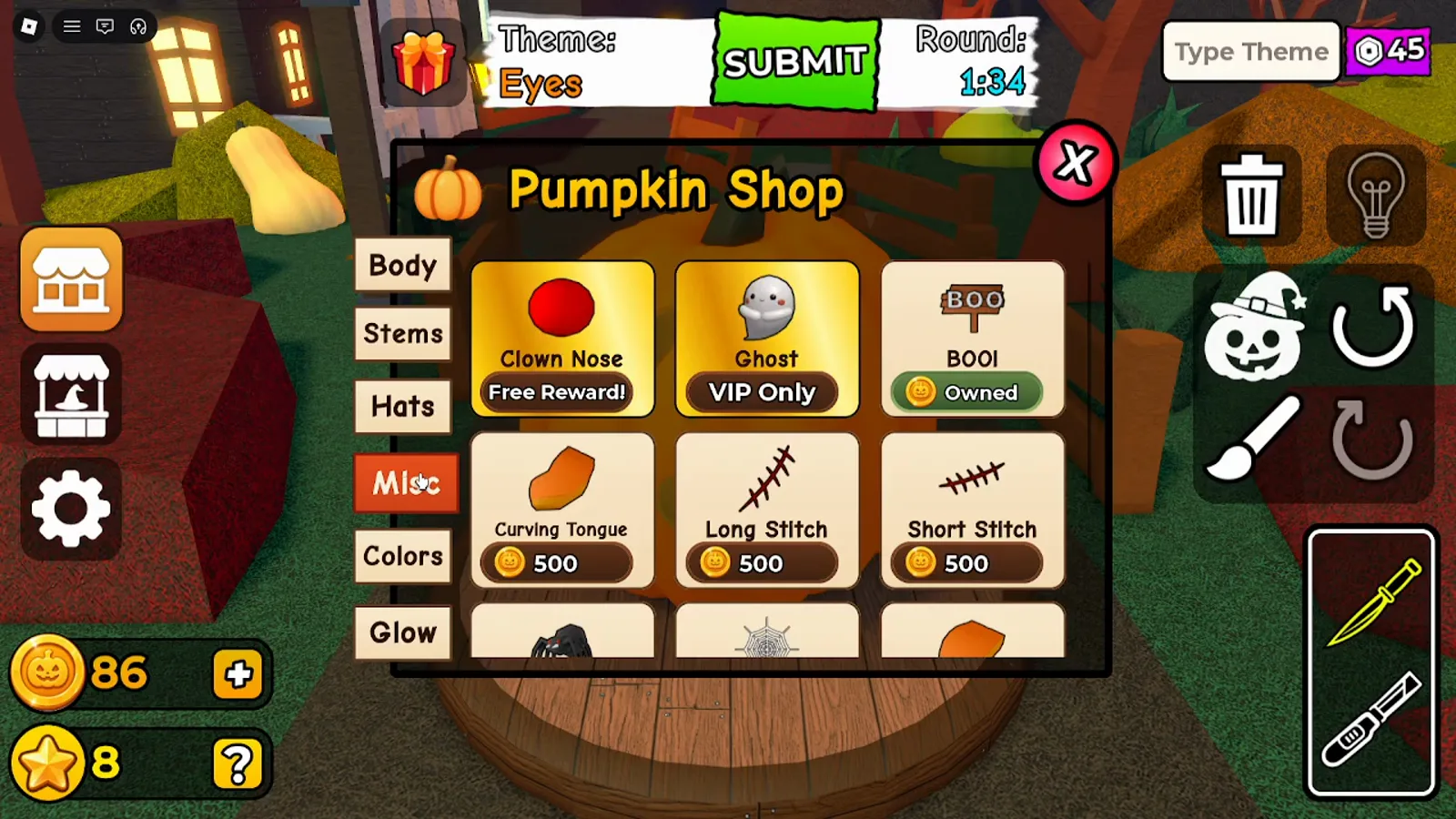
~5:40, Misc tab: the BOO! sign is marked Owned, which matches the “boo” accessory Andre’s narrator adds to his Nightmare and Scary pumpkins.
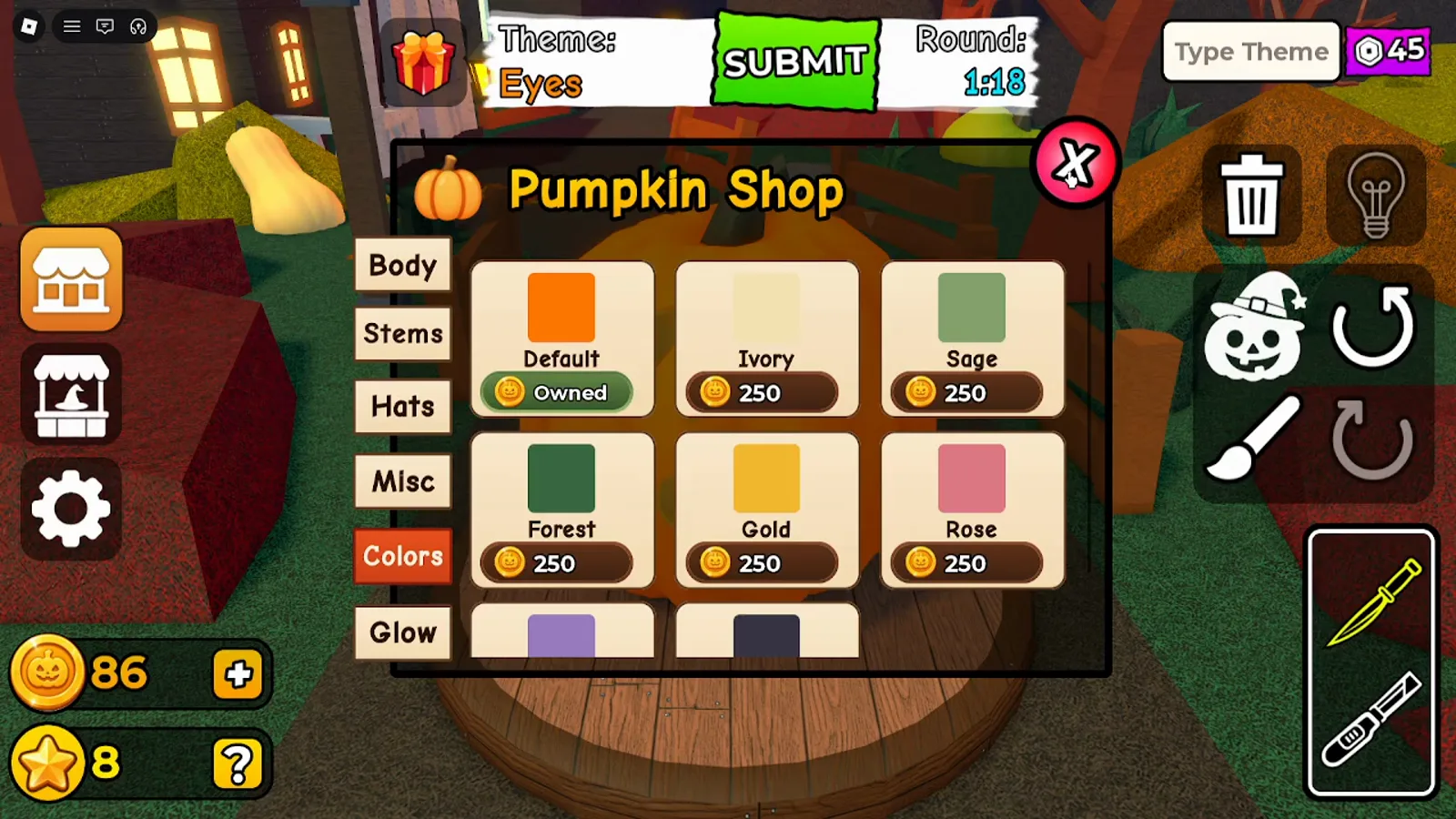
~5:56, Colors tab: Default is Owned, Ivory, Sage, Forest, Gold, Rose are 250 Coins each.
Free Reward: one card in each of the Body, Stems, Hats and Misc tabs carries a Free Reward! label. In both videos a Free Reward popup appeared with four steps: join the Roblox group Small Team Big Dreams Studios (spelled that way in the popup; Roblox lists the developer group as Small Team Big Dreams Studio), like the game, favorite the game, then press Verify!. We did not see what triggered the popup or what the reward grants, so treat it as an unexplained UI element for now.
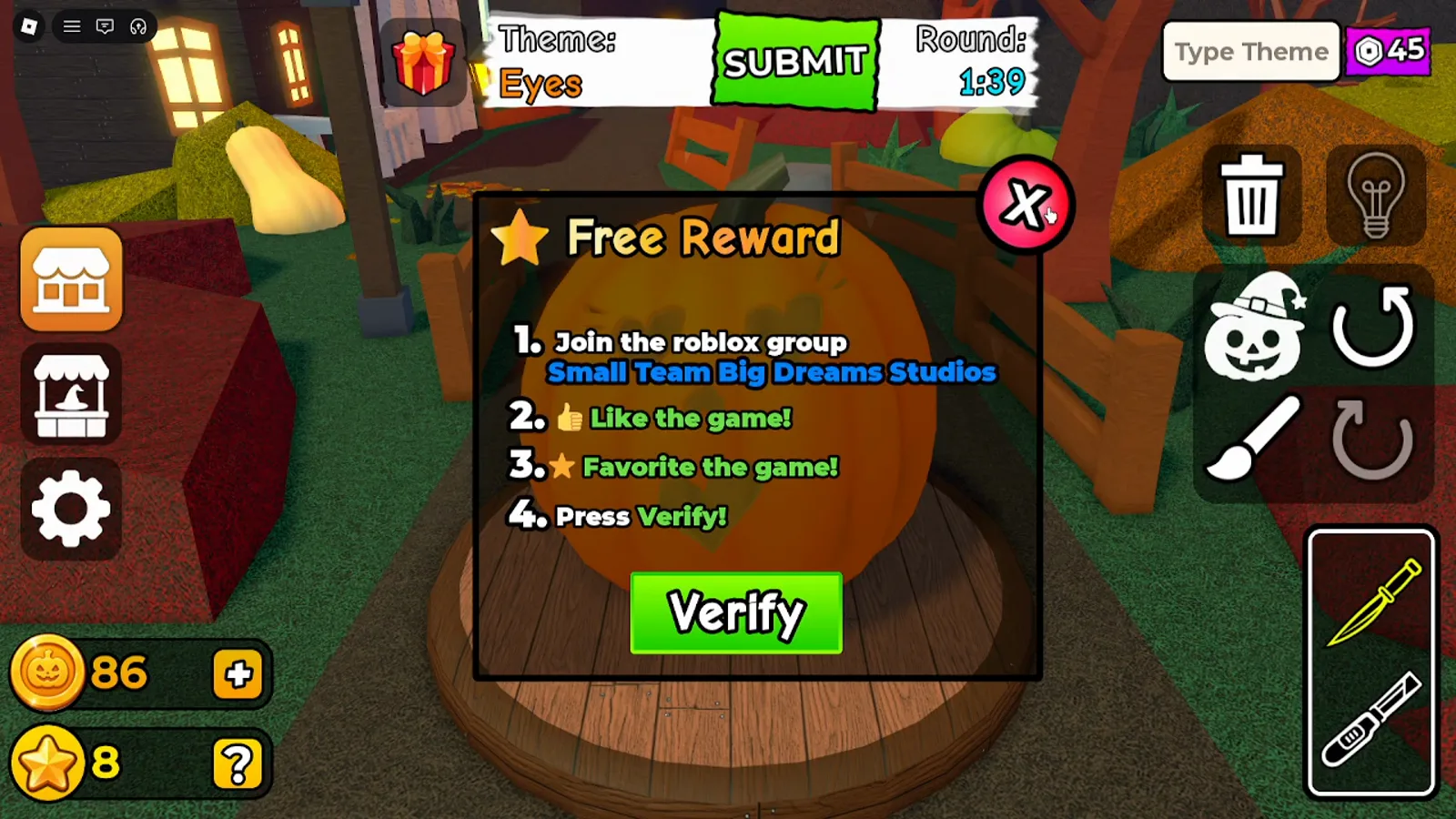
~5:35: the Free Reward popup over the carving view.
VIP Only: we only report that the banner appears on some cards in this footage. Roblox’s public game-passes list was empty for Carve a Pumpkin! as of 2026-10-11 (same date as our game info snapshot). We do not explain how to become VIP.
Decorating during carves ties to themes and the broader loop in the beginner guide; this page stays on economy UI.
What does the Playtime Rewards panel show?
Opening the gift-box icon shows a Playtime Rewards grid with eight slots. KawaiiCreeper’s ~6:02 still lists:
| Slot (left to right, top row then bottom) | Label we read | Timer / state |
|---|---|---|
| 1 | +50 Coins | Claimed! (checkmark) |
| 2 | Spider | 3m 51s |
| 3 | +75 Coins | 13m 51s |
| 4 | Witch Hat | 23m 51s |
| 5 | Corkscrew | 38m 51s |
| 6 | +250 Coins | 53m 51s |
| 7 | Tongue | 1hr 23m 51s |
| 8 | Green Glow | 1hr 53m 51s |
Andre’s ~2:39 frame shows the same eight rewards in the same order on a different account: slots 1 to 3 (+50 Coins, Spider, +75 Coins) are already Claimed!, and the rest show 5m 29s, 20m 29s, 35m 29s, 1hr 5m 29s and 1hr 35m 29s. Timers count down in real time. Whether rewards repeat daily or reset on rejoin is not yet verified. Two of the reward names, Corkscrew and Green Glow, also appear as priced cards in the shop tabs above.
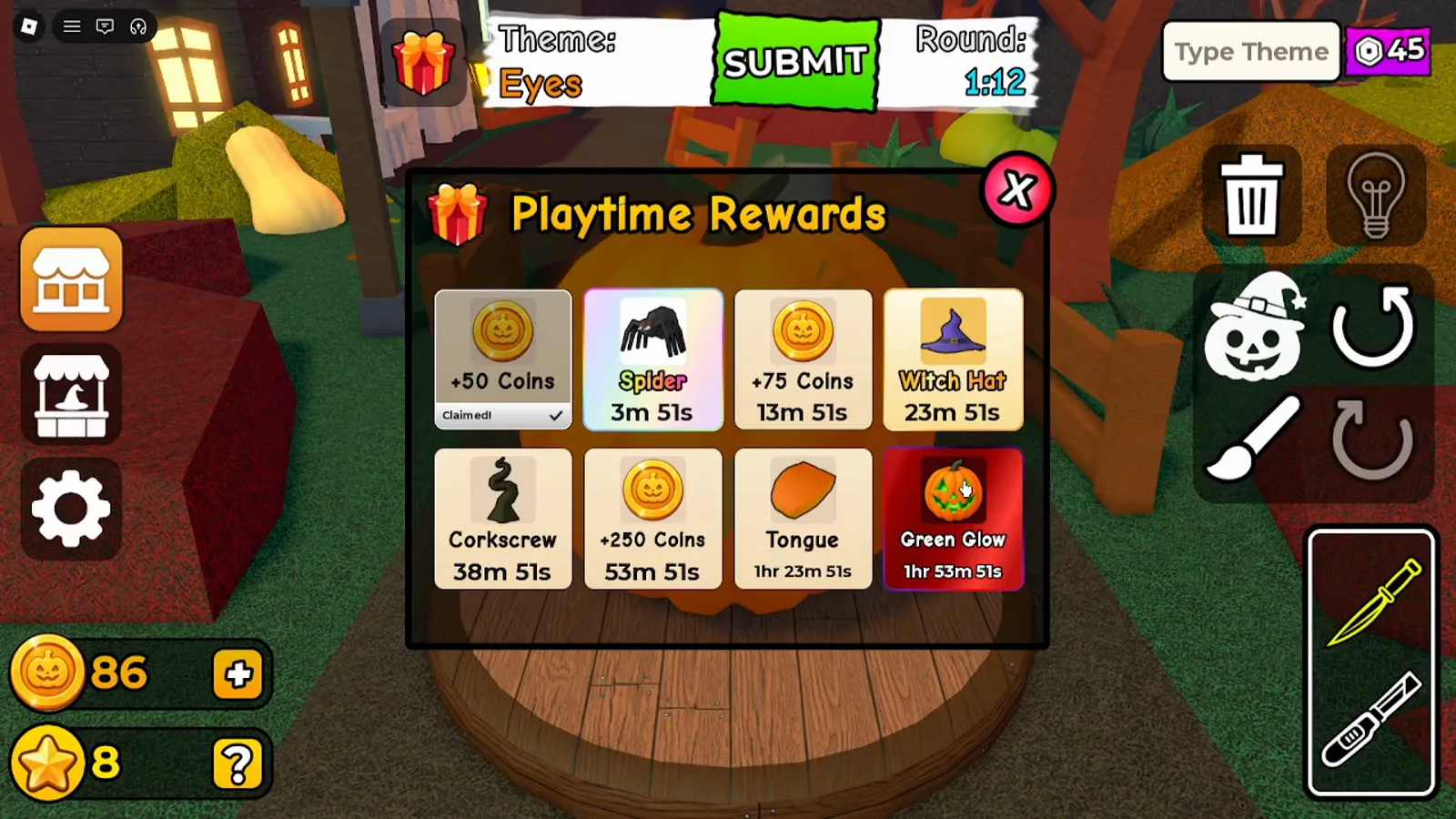
~6:02: first coin grant already Claimed!; the other slots show the countdown labels above.
How does the accessory editor look when placing hats and props?
During a carve, KawaiiCreeper opens a decoration view with category rows (Pumpkin Shape, Stem, Colors, Hats, Misc) and a Spider item selected (~28:50). The right panel shows Position / Rotate / Scale tabs and X, Y, Z sliders (for example X 0.45, Y 0.51, Z 0.50 on the Scale tab in our still). A green Finish! button sits bottom-right; Round 0:43 still counts down in the corner.
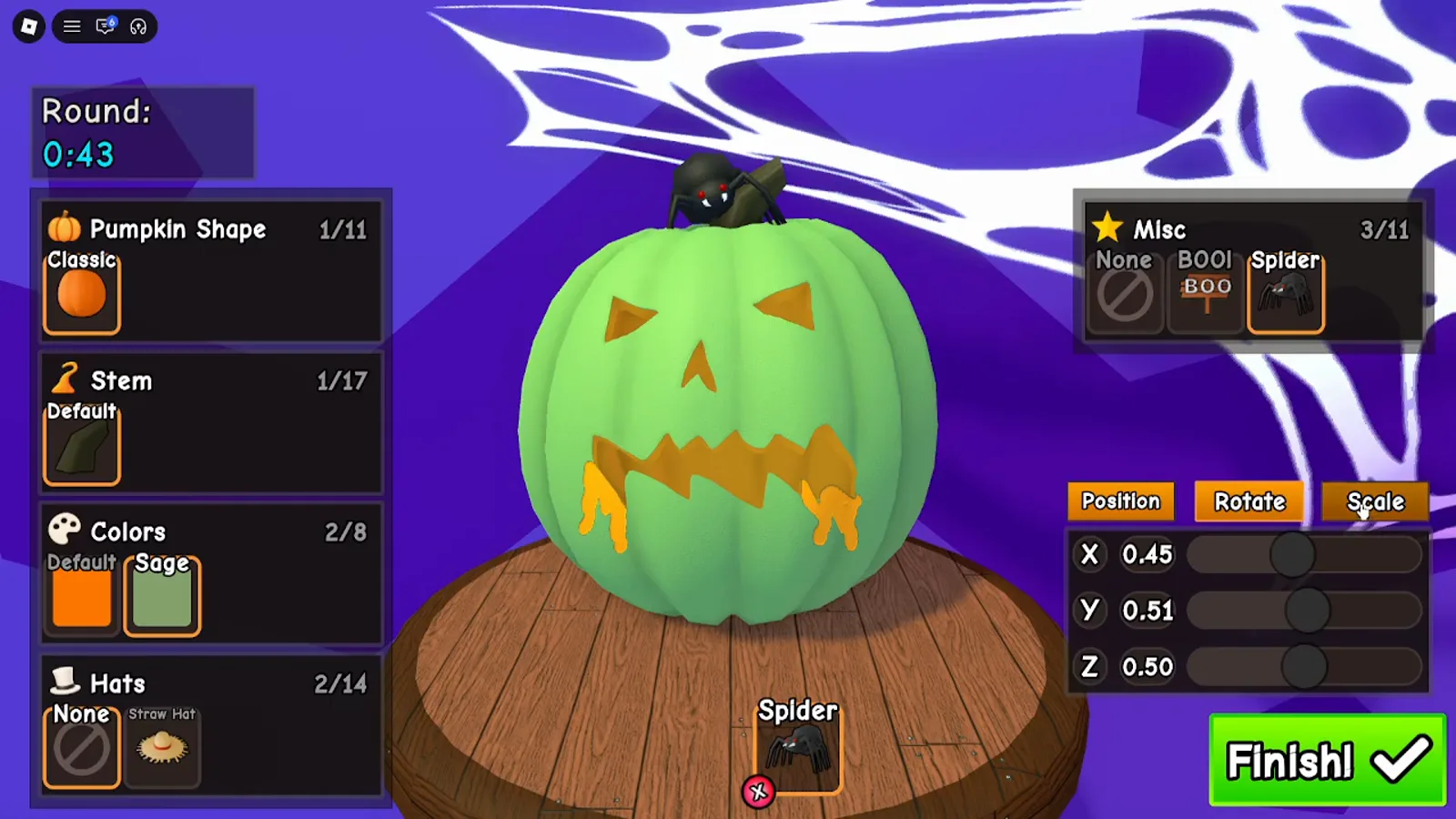
Andre’s Spanish audio at 9:14 says (in the auto-translated captions) “we’ll make it bigger and rotate it” while placing a spider. That matches the Scale/Rotate controls above, but we treat the narrator line as a hint, not a separate rules source.
What rank or title text appears above player names?
Floating nameplates show a colored title line above the username. For the two recording players, whose Stars counters we could read next to the nameplate, we saw:
| Title text | Video, time | Recording player’s Stars at that moment |
|---|---|---|
| Beginner | KawaiiCreeper, ~4:00 | 8 |
| Carver | Andre, ~2:39 and ~5:20 | 66 and 84 |
| Carver | KawaiiCreeper, ~22:11 and ~26:20 | 56 and 65 |
| Skilled Carver | Andre, ~9:52 | 109 (the Stars row is off-screen in that frame; the counter read 109 on both sides of it) |
| Skilled Carver | KawaiiCreeper, ~48:12 | 112 |
Nameplates lag the counter by a few seconds: in Andre’s video a podium nameplate still said Beginner when the HUD already read 66, and the title read Carver about eight seconds later. Both videos show the change from Beginner to Carver right after a results screen lifted the total past roughly 50 (Stars 41 → 56 in one, 48 → 66 in the other). The step to Skilled Carver happened somewhere between 85 and 109 Stars. A ladder with cutoffs near 50 and 100 would fit these readings, but we never saw a screen that states the cutoffs, so that is a guess. The word Expert Carver also appeared once, above a different player’s name late in Andre’s video; we did not see how it is earned.
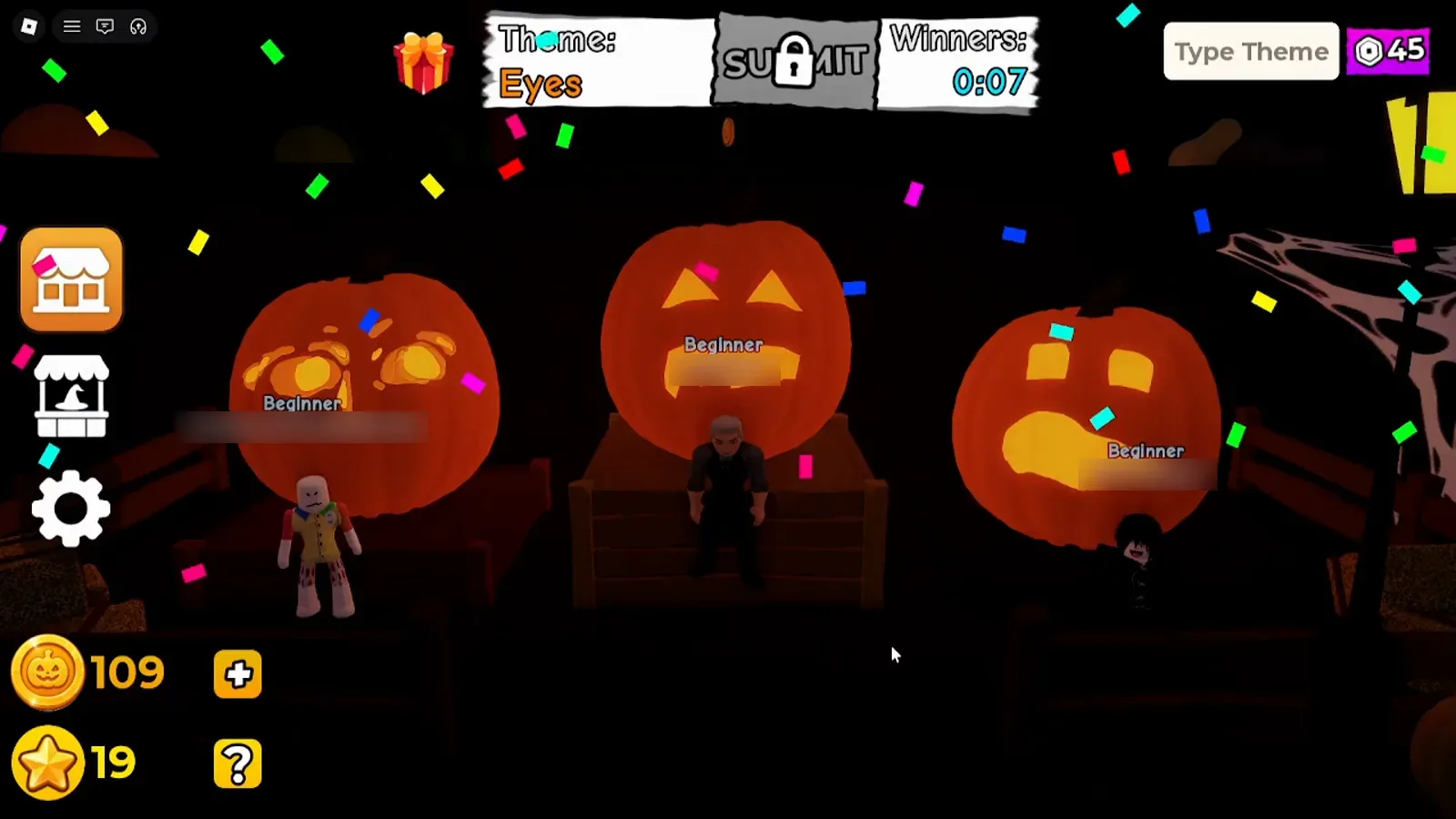
KawaiiCreeper ~8:14: the winners podium after the Eyes round, with Beginner above all three names and the HUD at 109 Coins / 19 Stars. Usernames are blurred.

KawaiiCreeper — Carve a Pumpkin! shop and rewards gameplay
Where do these observations come from?
| Video | Channel | Uploaded | Language | URL |
|---|---|---|---|---|
| gw8giYWu3Ss | KawaiiCreeper | 2026-10-11 | English audio (auto captions unreliable) | https://www.youtube.com/watch?v=gw8giYWu3Ss |
| WRXWjjoXVlo | Andre se hace Gamer | 2026-10-10 | Spanish audio (English auto subtitles) | https://www.youtube.com/watch?v=WRXWjjoXVlo |
Screenshots are illustrative frames from those recordings with other players’ usernames blurred; this page’s prose is original. Every number above was read from a video frame; narrator lines were used only as leads and checked against the picture. Both uploads contain jump cuts, so we do not infer time spans from video timestamps. We have not played Carve a Pumpkin! on our own accounts; numbers may change after patches.
What is still not yet verified?
| Topic | Status |
|---|---|
| Exact Coin payout per place (our 8 rounds are a small sample) | Not yet verified |
| How the Player Scores number is calculated | Not yet verified |
| What the purple-icon currency on Glow cards is | Not yet verified |
+ and ? counter buttons |
Not yet verified |
| VIP Only unlock method vs empty Game Pass API (2026-10-11) | Not yet verified |
| What triggers the Free Reward popup and what it grants | Not yet verified |
| Full shop catalog (cards below the first rows), sales rotation | Not yet verified |
| Title ladder cutoffs and how Expert Carver is earned | Not yet verified |
| Playtime Rewards reset cadence | Not yet verified |
If you are unsure which Roblox experience you installed, read which Carve a Pumpkin? before spending Robux or grinding currency.
Related Articles
guides
Carve a Pumpkin Roblox Themes: Prompts Seen in Real Rounds
See Carve a Pumpkin Roblox themes from real gameplay footage: HUD labels, timers, and how players carved Nightmare, Pirate, Weather and more (pool size unverified).
guides
Carve a Pumpkin Roblox Voting: How Stars and Results Work
See how Carve a Pumpkin Roblox voting works after carving: HUD phases, five-star ratings, reaction icons, Player Scores ties, and what still is not verified.
codes
Carve a Pumpkin! Codes: None Verified (Oct 2026)
As of Oct 2026 there are no verified Carve a Pumpkin! Roblox codes. Learn why old simulator lists fail and how to check new claims safely.
Was this helpful?
Thanks for the feedback!