
Carve a Pumpkin Roblox Themes: Prompts Seen in Real Rounds
See Carve a Pumpkin Roblox themes from real gameplay footage: HUD labels, timers, and how players carved Nightmare, Pirate, Weather and more (pool size unverified).
FAQ
Where does the theme appear in Carve a Pumpkin Roblox?
How many themes does Carve a Pumpkin have?
How long is the carving timer for a theme round?
Can you pick your own theme in Carve a Pumpkin?
Do themes repeat between rounds?
What should I carve for a hard theme like Pirate or Weather?
What does a theme look like in Carve a Pumpkin on Roblox?
During the carving phase, the top center bar shows Theme: plus the round prompt in stylized text, a green SUBMIT button, and a Round countdown (for example 2:44 or 1:58 in the rounds we captured). On the top right, a white field labeled Type Theme sits next to a purple icon with a number (40 in Andre se hace Gamer’s footage, 45 in KawaiiCreeper’s). We describe that layout only as visible UI—what typing in Type Theme does is not yet verified unless future footage shows it changing the assigned prompt.
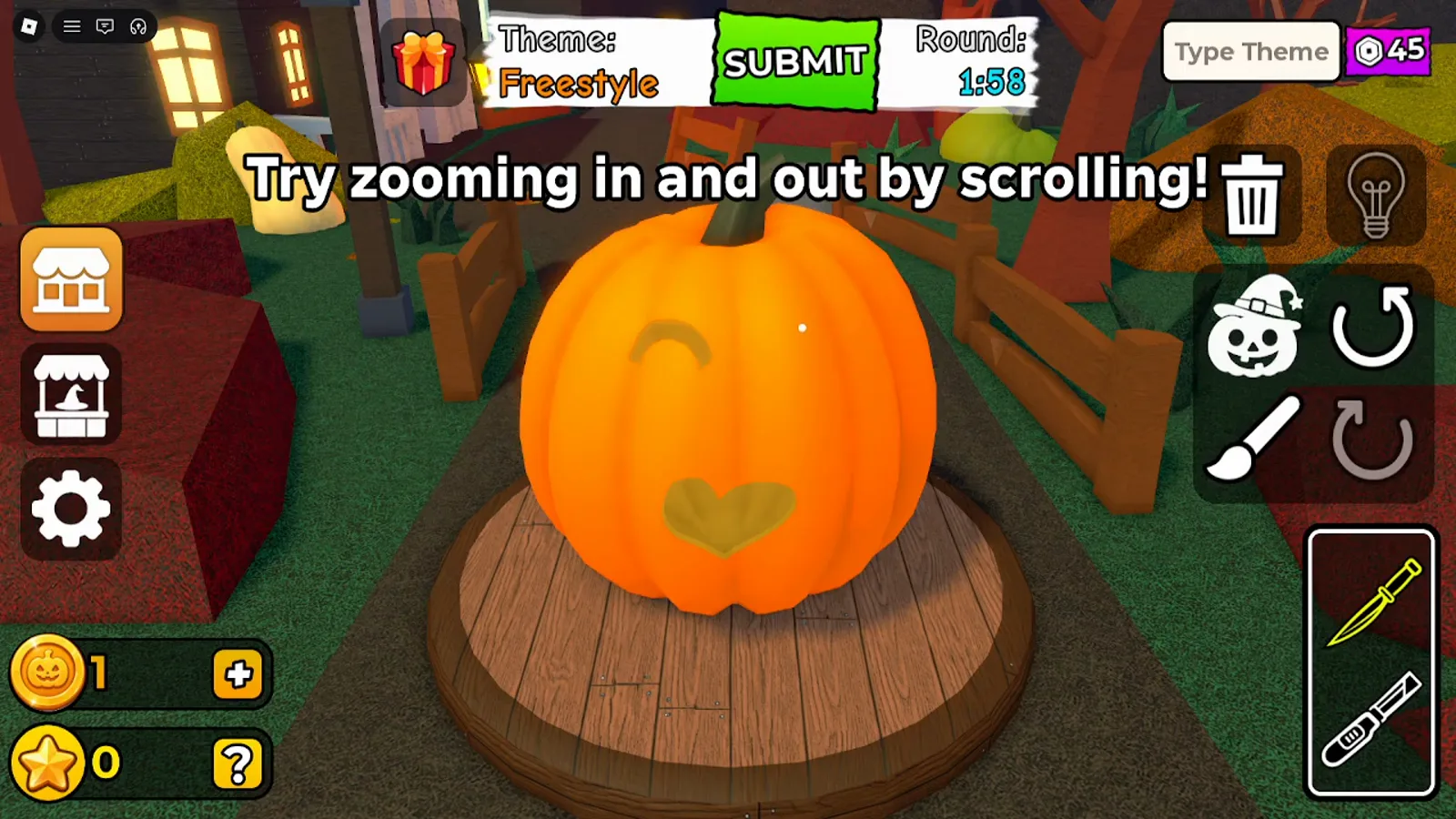
In KawaiiCreeper’s video (uploaded 2026-10-11), the Freestyle round shows the Theme / SUBMIT / Round cluster and the Type Theme box with “45” beside the purple icon.
Which theme names did we read on screen in two gameplay videos?
We built the table below from theme text visible on the HUD in two Let’s Play–style recordings. For KawaiiCreeper’s video we sampled the HUD every 30 seconds, so those times are accurate to about half a minute. For Andre’s video the times come from the caption timeline and are rougher. Both uploads contain jump cuts, so a timer does not always keep counting across a cut. The carving notes use only what we saw in a frame or what the narrator said while carving; a dash means we read the label but did not review the carving.
| Theme (HUD text) | Video | Approx. time | What we saw or heard |
|---|---|---|---|
| Nightmare | WRXWjjoXVlo | ~0:00 | Narrator aims for “a terrifying pumpkin” and adds a boo accessory. |
| Mustache Face | WRXWjjoXVlo | ~1:00 | Curved mustache cuts plus a straw hat accessory (frame checked). |
| Favorite Food | WRXWjjoXVlo | ~2:45 | Narrator plans a hamburger; a pizza-slice pumpkin shows up in voting. |
| Scary | WRXWjjoXVlo | ~5:30 | Jagged mouth with big teeth (narrator: “Dracula’s big teeth”), boo accessory again. |
| Pirate | WRXWjjoXVlo | ~6:15 | An eye patch shape plus a cross-shaped cut the narrator calls a scar. |
| Fire | WRXWjjoXVlo | ~8:15 | A face “like it’s on fire” with a blazing-fire mouth; narrator adds his spider. |
| Devil | WRXWjjoXVlo | ~11:00 | Horns and a smile; narrator says he forgot the horns at first. |
| King | WRXWjjoXVlo | ~13:25 | Cape silhouette, head and crown, scepter, sparkles; other pumpkins used dollar signs. |
| Freestyle | gw8giYWu3Ss | ~0:00 | No fixed prompt; a winking face with a cat-style mouth in the frame we checked. |
| Eyes | gw8giYWu3Ss | ~4:00 | Heart-shaped eye cutouts on an orange pumpkin. |
| Treasure | gw8giYWu3Ss | ~8:30 | A chest-like shape with a latch tab appears on a pumpkin shown in voting. |
| Balloon | gw8giYWu3Ss | ~13:30 | — |
| Robot | gw8giYWu3Ss | ~14:00 | — |
| Classic Halloween | gw8giYWu3Ss | ~18:00 | Triangle eyes and a zigzag grin on a pumpkin shown in voting. |
| Fish | gw8giYWu3Ss | ~22:30 | — |
| Scary | gw8giYWu3Ss | ~26:40 and ~35:30 | Green sage pumpkin with a jagged mouth and a Spider placed on top (first run). |
| Weather | gw8giYWu3Ss | ~31:00 | Rain cloud over a house and fence on a pumpkin shown in voting; a sage-colored pumpkin with cloud and rain cuts in our carving frame. |
| Alien | gw8giYWu3Ss | ~40:00 | — |
| Happy | gw8giYWu3Ss | ~44:30 | — |
Count in this sample: 18 unique theme names. “Scary” is listed once in the count but showed up in three rounds: once in Andre’s video and twice in KawaiiCreeper’s. The 18 is not the official theme pool size—only what appeared in roughly 48 minutes of KawaiiCreeper footage and 16 minutes of Andre footage.
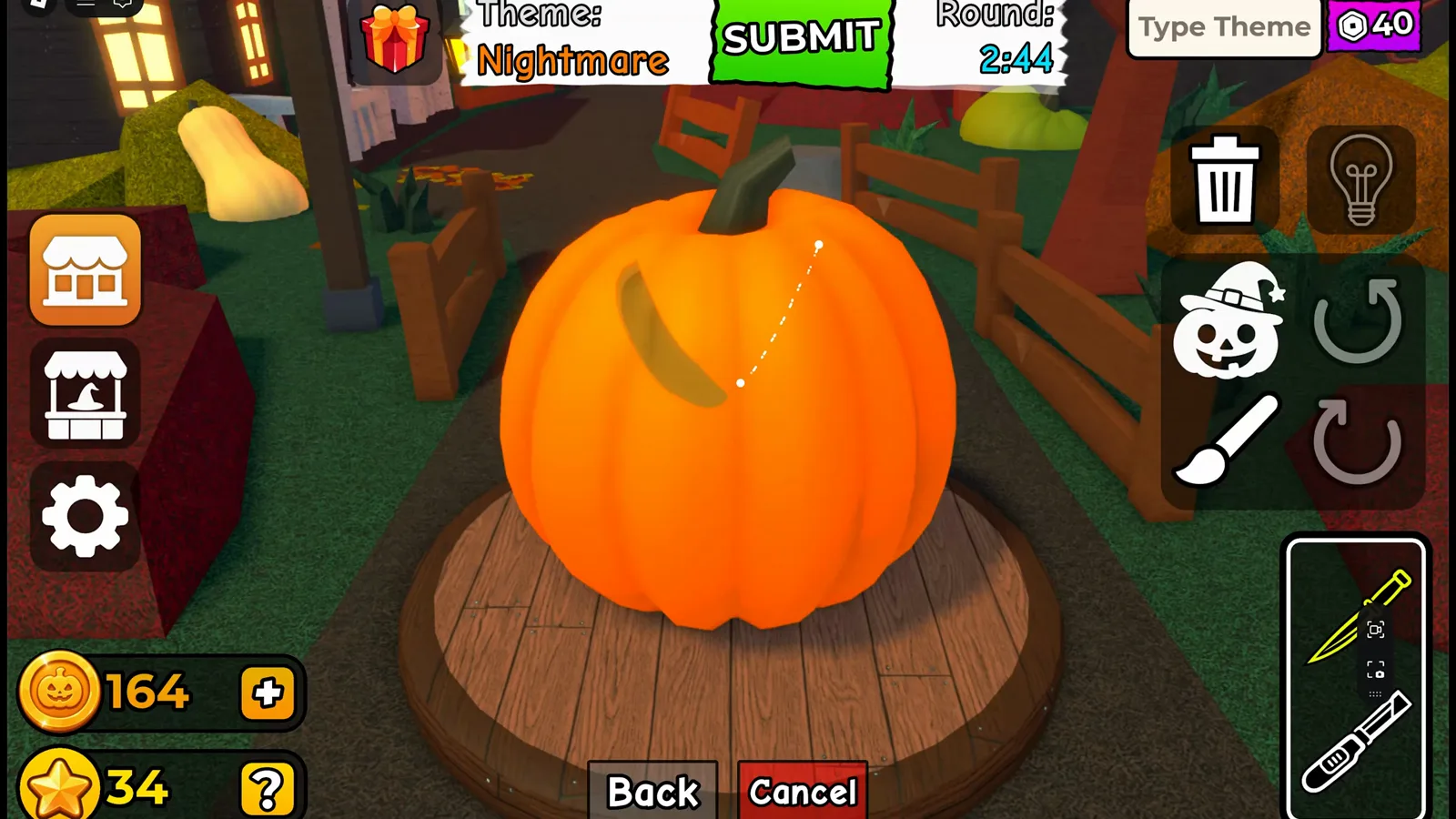
Andre se hace Gamer’s upload (2026-10-10) opens on a round labeled Nightmare with Round 2:44 on screen.
How long is the Round timer, and what on-screen hints appear?
The official description says three minutes to carve. In KawaiiCreeper’s video a frame five seconds after an Intermission 0:03 reading shows Round 2:58 on a new theme (Balloon), and another 15 seconds later reads 2:43. That fits a 3:00 start, but we never captured a frame that clearly reads 3:00, so the exact start value is not yet verified. Other readings we saw include 2:44 (Andre’s opening round) and, in KawaiiCreeper’s opening Freestyle round, 2:58 on the very first frame, then 1:58 and 0:58 at one and two minutes into the video, so the timer counted down in real time there.
The timer keeps running behind the decoration menus: one frame shows Round 0:43 with the accessory editor open on a Spider item. Whether that is a rule for every menu is not confirmed.
In KawaiiCreeper’s early Freestyle round we saw the on-screen hints “Drag your mouse to cut out a piece!” and later “Try zooming in and out by scrolling!”—tutorial text only, not theme names.
How did players interpret themes in the footage?
These notes are observations from specific pumpkins, not scoring rules.
Andre se hace Gamer (WRXWjjoXVlo): For Nightmare and Scary, the narrator leaned into sharp teeth and added a “boo” accessory (a BOO! item is also in the shop’s Misc tab in the other video, see Coins, Stars and shop). Mustache Face became literal mustache cuts plus a straw hat. Pirate used classic pirate shorthand (eye patch, a cross-shaped cut). Fire was a flame-style mouth with a spider prop. King combined a caped silhouette, crown, scepter, and sparkles.
KawaiiCreeper (gw8giYWu3Ss): Weather stacked a cloud and rain drops on a sage-colored pumpkin. Scary used the same sage color plus a Spider attachment. Eyes led to heart-shaped cutouts rather than a literal object.
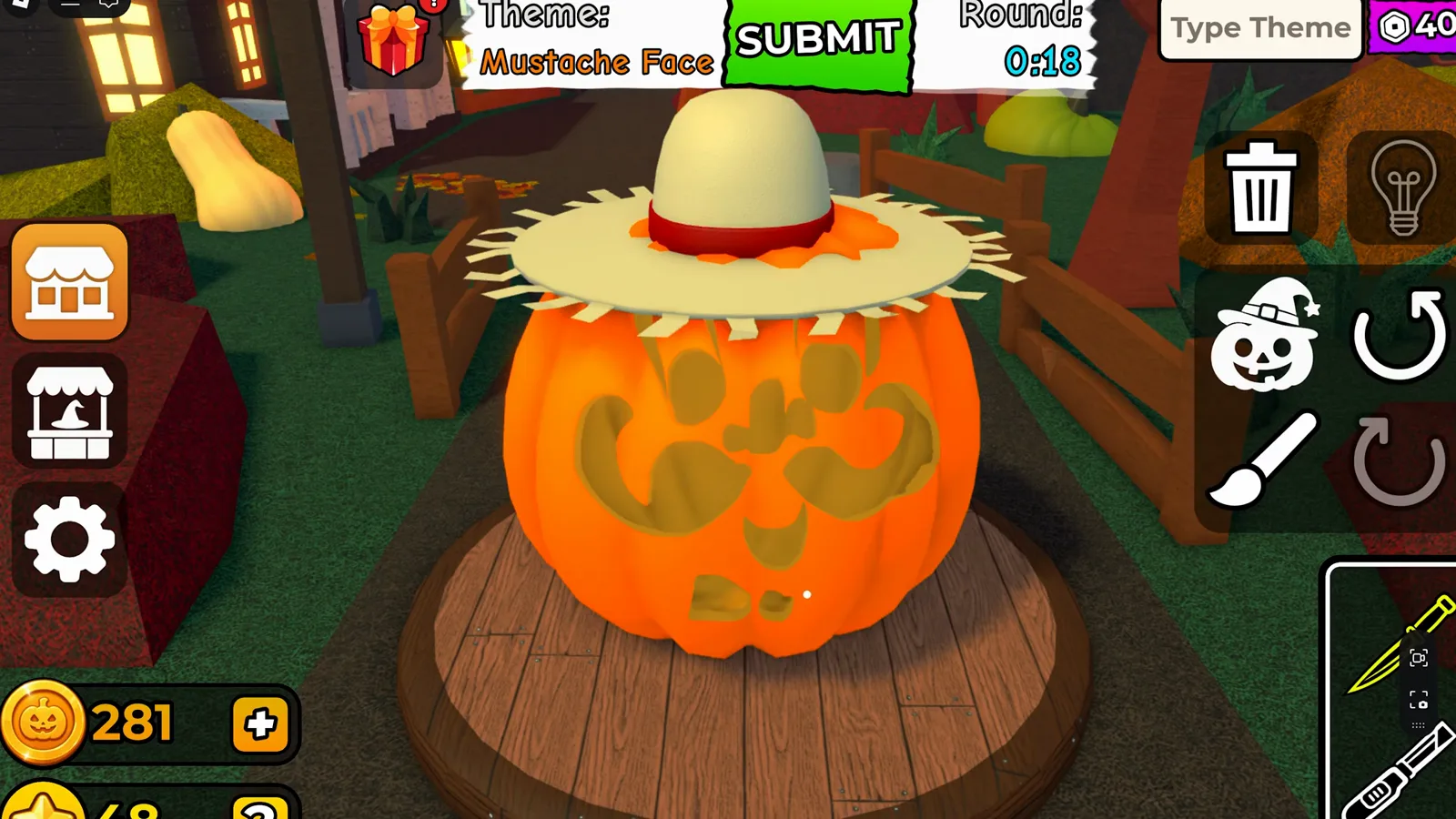
Mustache Face in Andre’s video: literal mustache carving plus a straw hat before time expired.
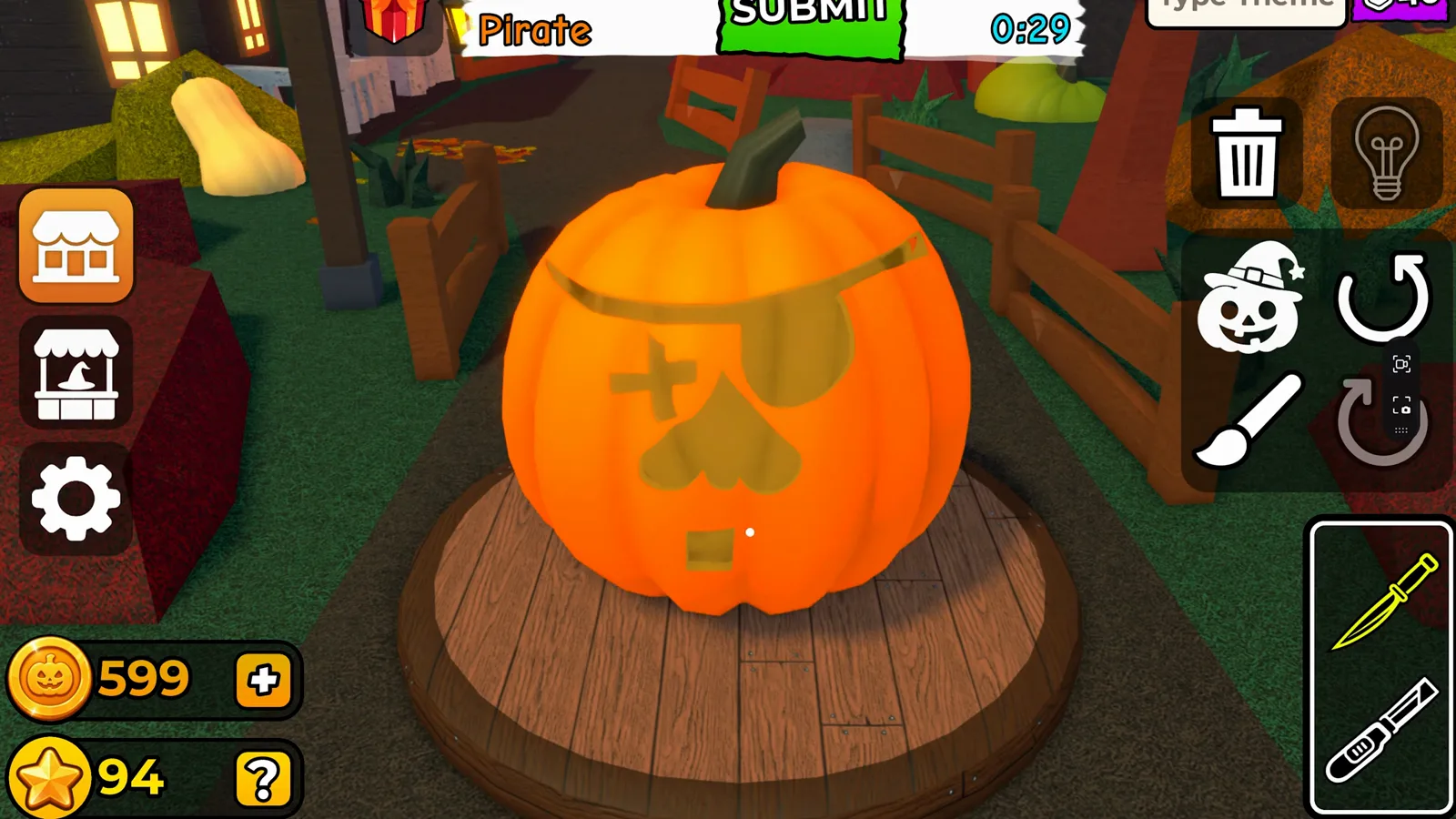
Pirate round HUD with eye-patch-style carving still in progress.
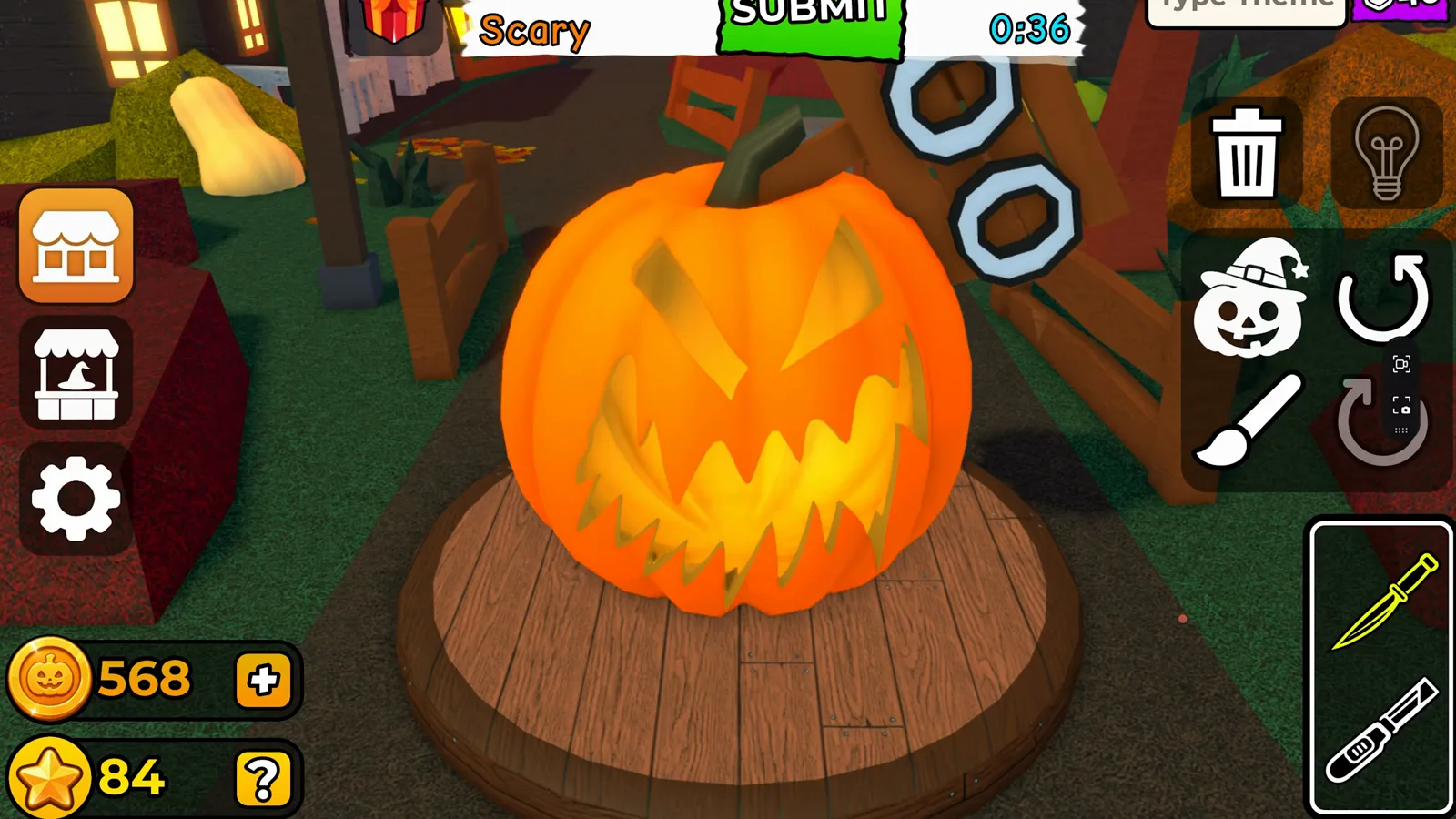
Scary theme in Andre’s footage: triangular eyes and a jagged tooth mouth before submit.
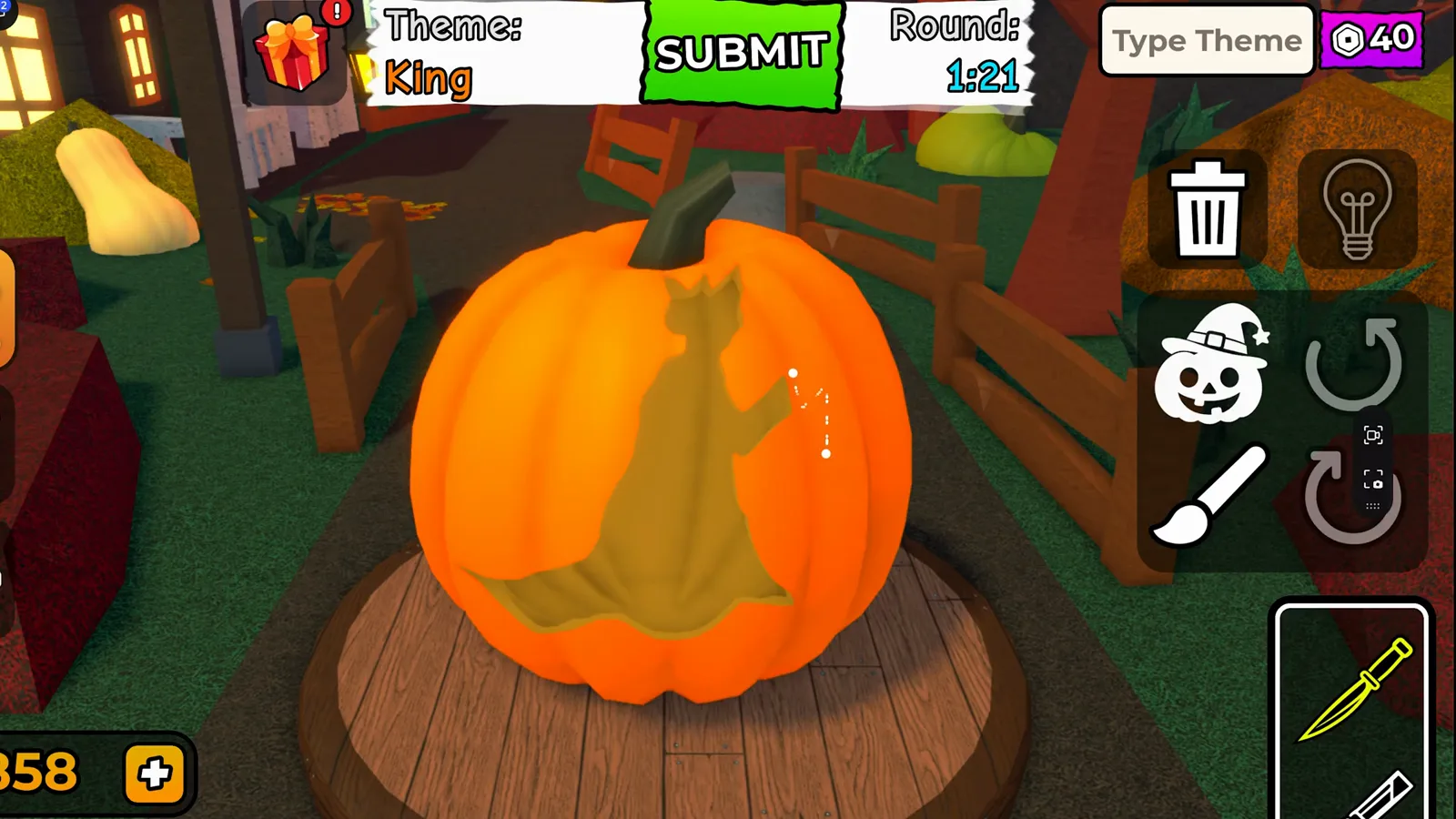
King theme: a caped silhouette in progress with Theme: King on the HUD. The narrator describes adding the head and crown next; the crown is not yet visible in this frame.
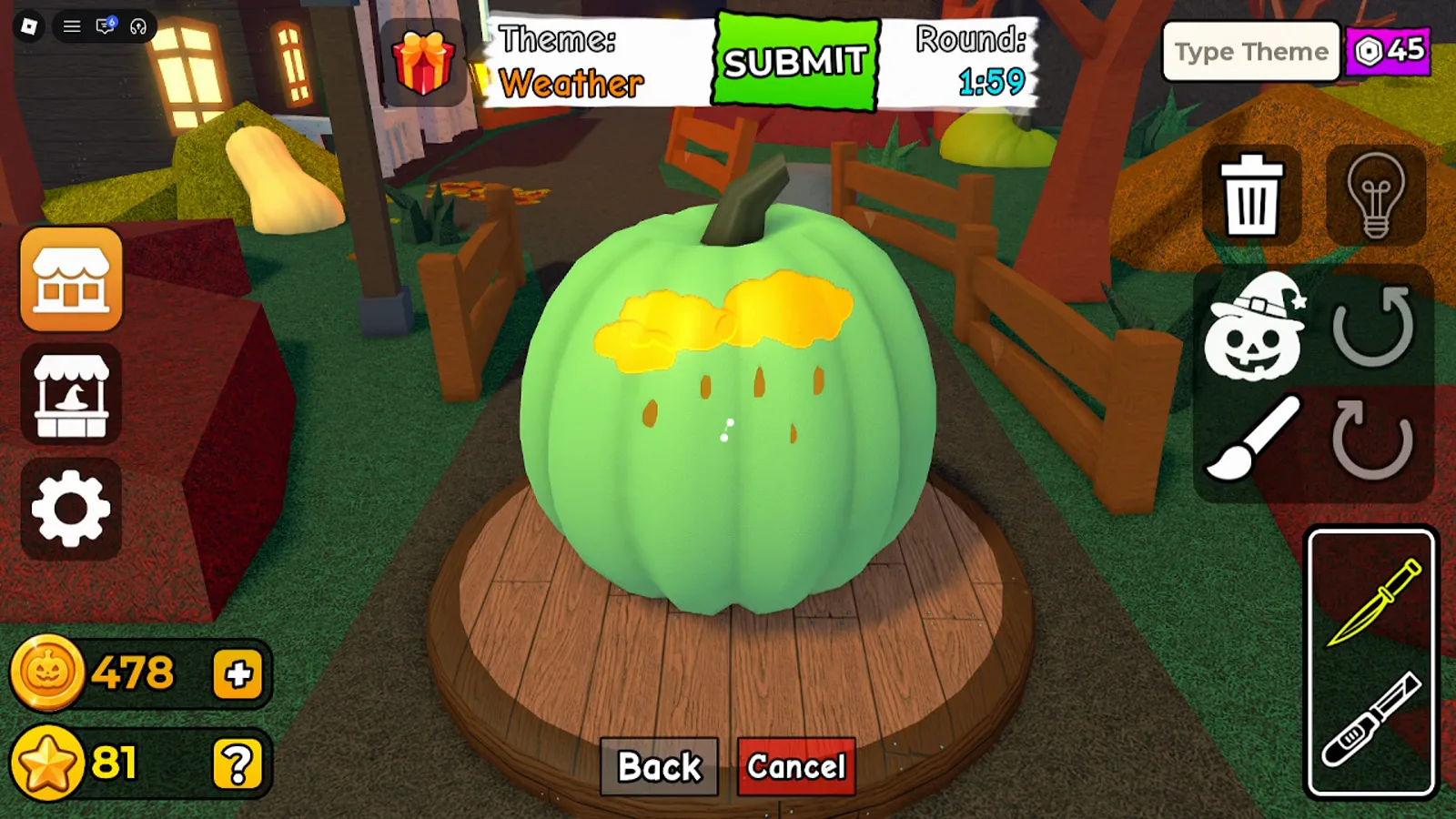
Weather theme in KawaiiCreeper’s video: cloud and rain-drop cuts with Theme: Weather visible.
Our suggestions (not game mechanics)
- Read the HUD first, then sketch one big idea that reads from a distance—voters see each pumpkin only briefly during voting and results.
- Mix one literal cue + one prop when the theme is abstract (for example Weather = cloud + rain; Pirate = eye patch + a scar)—only if you already own the prop in the shop.
- Save
SUBMITfor when cuts and must-have accessories are placed; the Round timer keeps running behind the accessory editor. - If you are new to tools, start with how to play and the beginner guide before chasing obscure themes.
How are themes chosen, and can they repeat?
| Question | Status |
|---|---|
| Full list of themes in the live game | Not yet verified |
| Random draw vs playlist vs player vote for next theme | Not yet verified |
Whether Type Theme overrides the assigned prompt |
Not yet verified |
| Whether themes can repeat | Seen: “Scary” twice in one video, about eight minutes apart |
| Whether themes can repeat back-to-back | Not yet verified |
We can report that 18 different HUD names appeared across the two videos named above and that Scary repeated. That is useful for planning practice, not proof of rotation logic.
Where should I go next on this wiki?
- How to play Carve a Pumpkin! — official loop (carve → vote → Stars/Coins) without fake numbers.
- Voting and results — what happens after you hit SUBMIT.
- Coins, Stars, and shop — currency and item menus seen beside carving.
- Which Carve a Pumpkin? — avoid mixing in 2018 Pumpkin Carving Simulator or farm sim clones.
Where do these observations come from?
| Source | Channel | Upload date | Language | How we used it |
|---|---|---|---|---|
| WRXWjjoXVlo | Andre se hace Gamer | 2026-10-10 | Spanish audio; auto-translated English captions (treated as a clue only) | Theme HUD frames + player commentary on accessories |
| gw8giYWu3Ss | KawaiiCreeper | 2026-10-11 | English audio; no reliable captions | Theme HUD read purely from video frames |
Screenshots are illustrative references of UI seen in third-party gameplay, with other players’ usernames blurred; the prose is original to carveapumpkinguide.wiki. We have not independently played every theme in-game as of 2026-10-12.

Carve a Pumpkin gameplay showing multiple Theme HUD prompts (Andre se hace Gamer)
What is still not verified?
| Topic | Notes |
|---|---|
| Complete theme pool size | 18 names seen in two videos ≠ full catalog. |
| Theme draw / weighting / repeat rules | Only sample observations (Scary repeated). |
Type Theme purpose |
Field visible; behavior not demonstrated in our footage. |
| Exact Round timer start | 2:58 seen right after an intermission; 3:00 start not captured. |
| Whether accessories count as “on theme” for scoring | Players used hats and spiders; scoring was not analyzed here. |
Related Articles
guides
Carve a Pumpkin Roblox Coins, Stars and Shop: What We Saw
Carve a Pumpkin Roblox Coins and Stars from real rounds: results-screen payouts by place, Pumpkin Shop prices, Playtime Rewards and title labels, with limits.
guides
Carve a Pumpkin Roblox Voting: How Stars and Results Work
See how Carve a Pumpkin Roblox voting works after carving: HUD phases, five-star ratings, reaction icons, Player Scores ties, and what still is not verified.
codes
Carve a Pumpkin! Codes: None Verified (Oct 2026)
As of Oct 2026 there are no verified Carve a Pumpkin! Roblox codes. Learn why old simulator lists fail and how to check new claims safely.
Was this helpful?
Thanks for the feedback!