
Carve a Pumpkin Roblox Voting: How Stars and Results Work
See how Carve a Pumpkin Roblox voting works after carving: HUD phases, five-star ratings, reaction icons, Player Scores ties, and what still is not verified.
FAQ
How does voting work in Carve a Pumpkin Roblox?
How many stars can you give in Carve a Pumpkin voting?
Can you vote for your own pumpkin in Carve a Pumpkin?
How do ties work when you win Carve a Pumpkin Roblox?
What happens after winners are announced?
How long is each voting phase in Carve a Pumpkin?
How does a full Carve a Pumpkin round flow from carving to results?
In the two gameplay videos we reviewed, a round moves through six beats, and the top HUD label names each one. This matches the high-level Roblox description (carve, then vote for the best pumpkin), but the footage adds two beats the store page does not mention: a Scores board and an Intermission.
| Stage (footage order) | HUD label we read | Timer readings | What the screen shows |
|---|---|---|---|
| Carve | Round: + theme name |
2:58 just after a new round opened | Lit workshop, pumpkin on a pedestal, green SUBMIT, carving tools. After submitting, the button turned red EDIT (Round 0:34 in one frame). |
| Vote | Voting: |
0:02 to 0:06 in ten frames | Dark background, one lit pumpkin, five stars, reaction icons; SUBMIT greyed with a lock. |
| Splash | none | n/a | “And the winners are…” on black, seen in both videos. |
| Results | Winners: |
0:07 down to 0:01 | Three pumpkins on podiums, confetti. |
| Scoreboard | Scores: |
0:08 down to 0:02 | Player Scores board with ranks and star totals. |
| Lobby | Intermission: |
0:15 down to 0:03 | Avatars walk the outdoor lobby; gold coins sit on the grass. |
Then the next Round: begins, with 2:58 on the clock in the one frame we caught right after an intermission. The Round timer is covered in more detail on the themes guide.
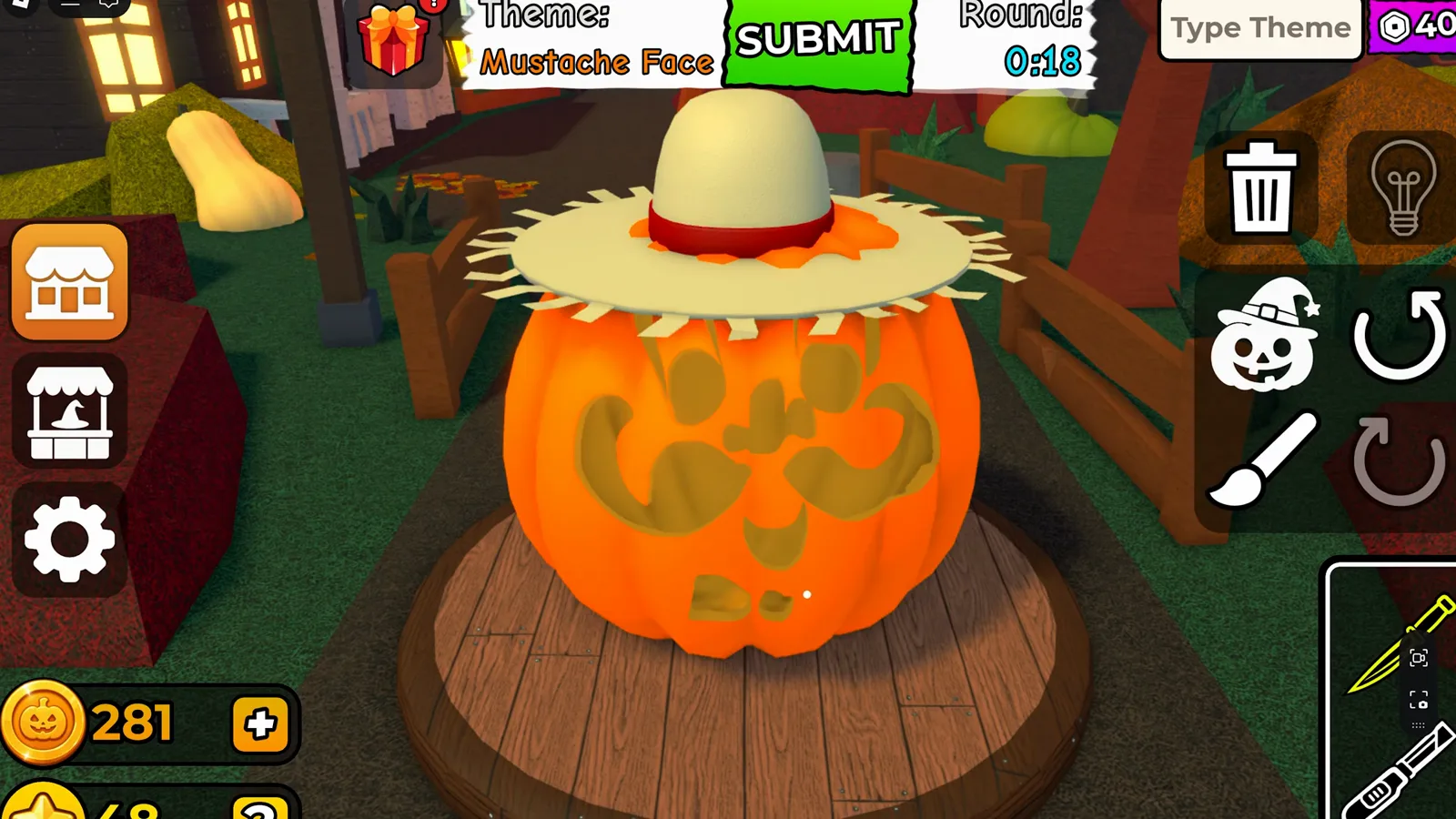
Carving uses the Round: timer; this Mustache Face round had 0:18 left when captured from Andre se hace Gamer’s video (uploaded 2026-10-10).
What does the voting screen look like and what can you click?
When Voting: appears, the world background goes dark and one pumpkin at a time is lit on a wooden platform. Along the bottom center are five star icons, grey when empty and yellow when filled. Pumpkins showed one star already lit in ten of the thirteen voting frames we examined (two frames showed three lit, one showed four), and the narrator talks about “leaving it with one star” for a pumpkin that “didn’t try very hard.” On the right edge there is a vertical stack of four round reaction icons (a grin, a thumbs-up, a neutral face and a surprised face). Small copies of those icons floated up beside the stack in some frames, and the narrator says “I’m getting thumbs up,” so reactions seem to reach the pumpkin’s owner. What each icon does beyond that is not yet verified.
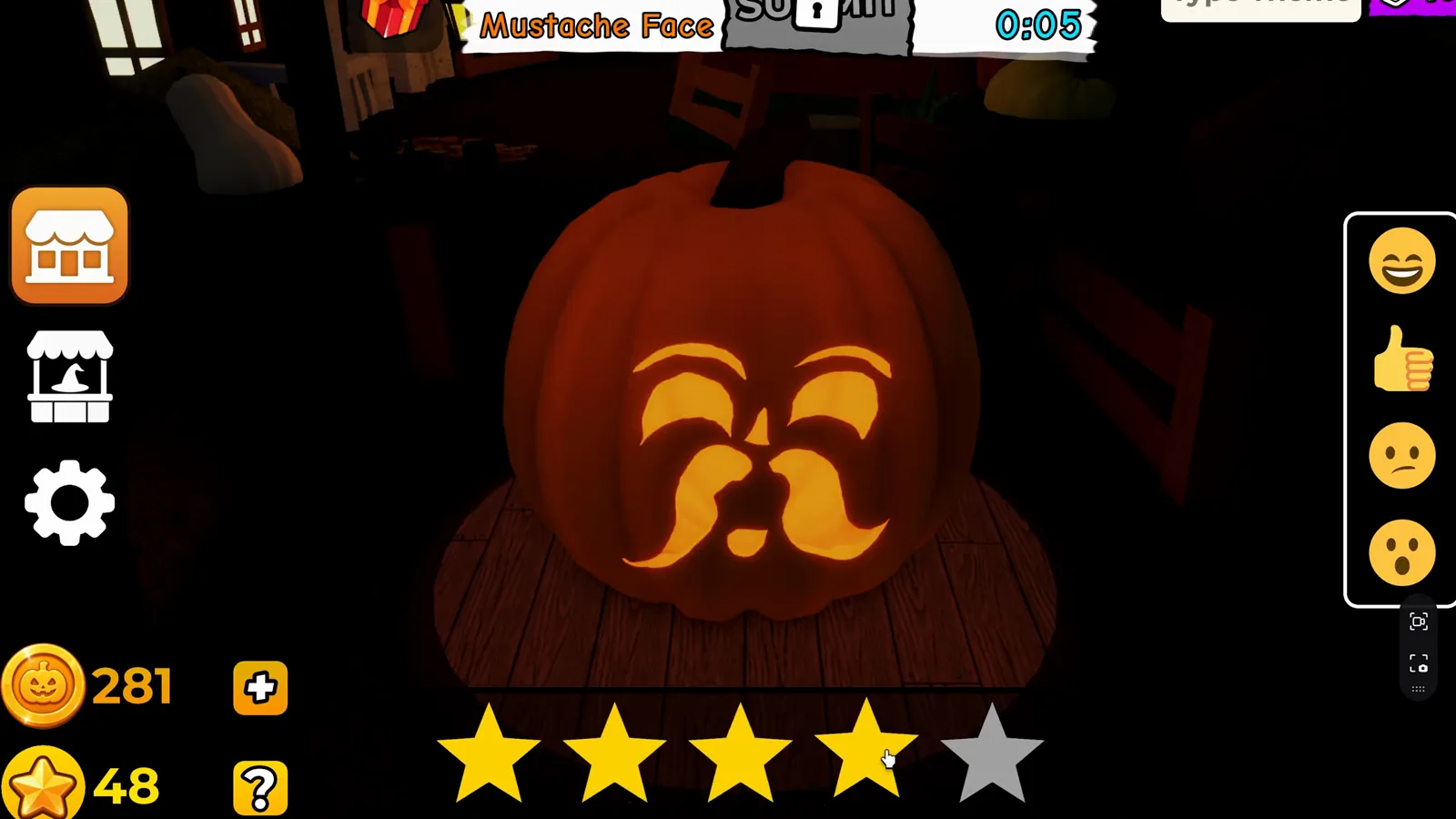
Andre se hace Gamer’s footage: Voting timer 0:05 with four of five stars lit on a Mustache Face entry. The Voting: label is cropped off the top of this frame.
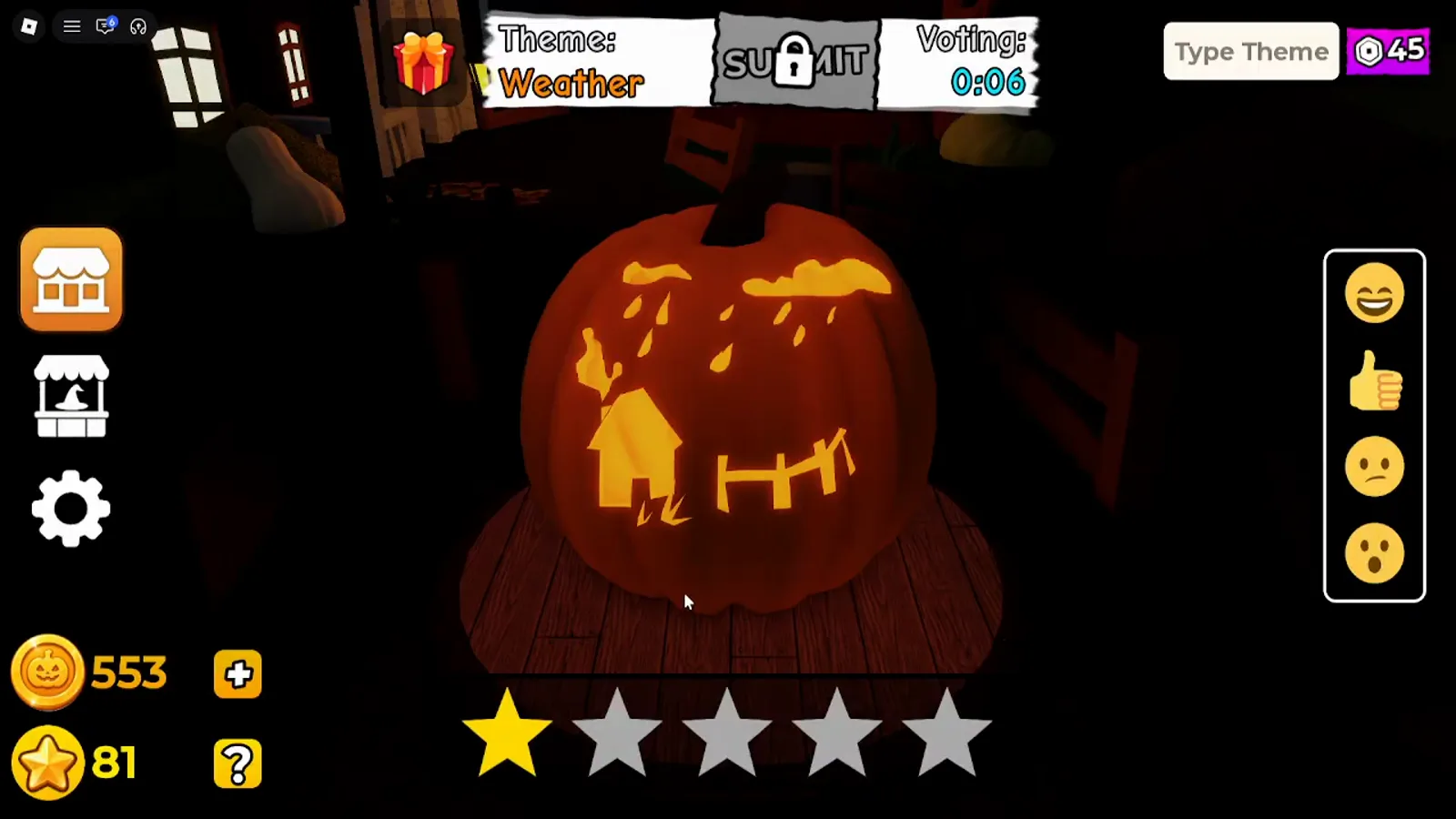
KawaiiCreeper’s video (2026-10-11): Theme: Weather, Voting: 0:06, one star lit.
Frames from Andre’s Favorite Food round show a pizza-slice pumpkin going from one lit star to three within four seconds, matching the narrator’s “we’re going to give it three stars because it’s competition. I would have given it four.” His other ratings included four stars for pumpkins he liked and, once, two stars, so players choose different values per pumpkin.
We cannot turn these snippets into a fixed “seconds per pumpkin” rule. The timer never read above 0:06 and the pumpkin on stage changed every few seconds, so a per-pumpkin countdown of roughly six seconds is plausible. We did not time a full lobby, so treat it as not yet verified.
How are winners shown and how do placements work?
After the last pumpkin, footage shows “And the winners are…” on black, then Winners: with a short timer. Three carved pumpkins stand on wooden podiums, with the center stand tallest, while confetti falls. In the Mustache Face round, Andre’s narrator says “tied for first” and then “let’s see my second place,” and his pumpkin is on the left stand next to the tall center one, which fits a 2-1-3 podium layout. We did not confirm that layout in other rounds.
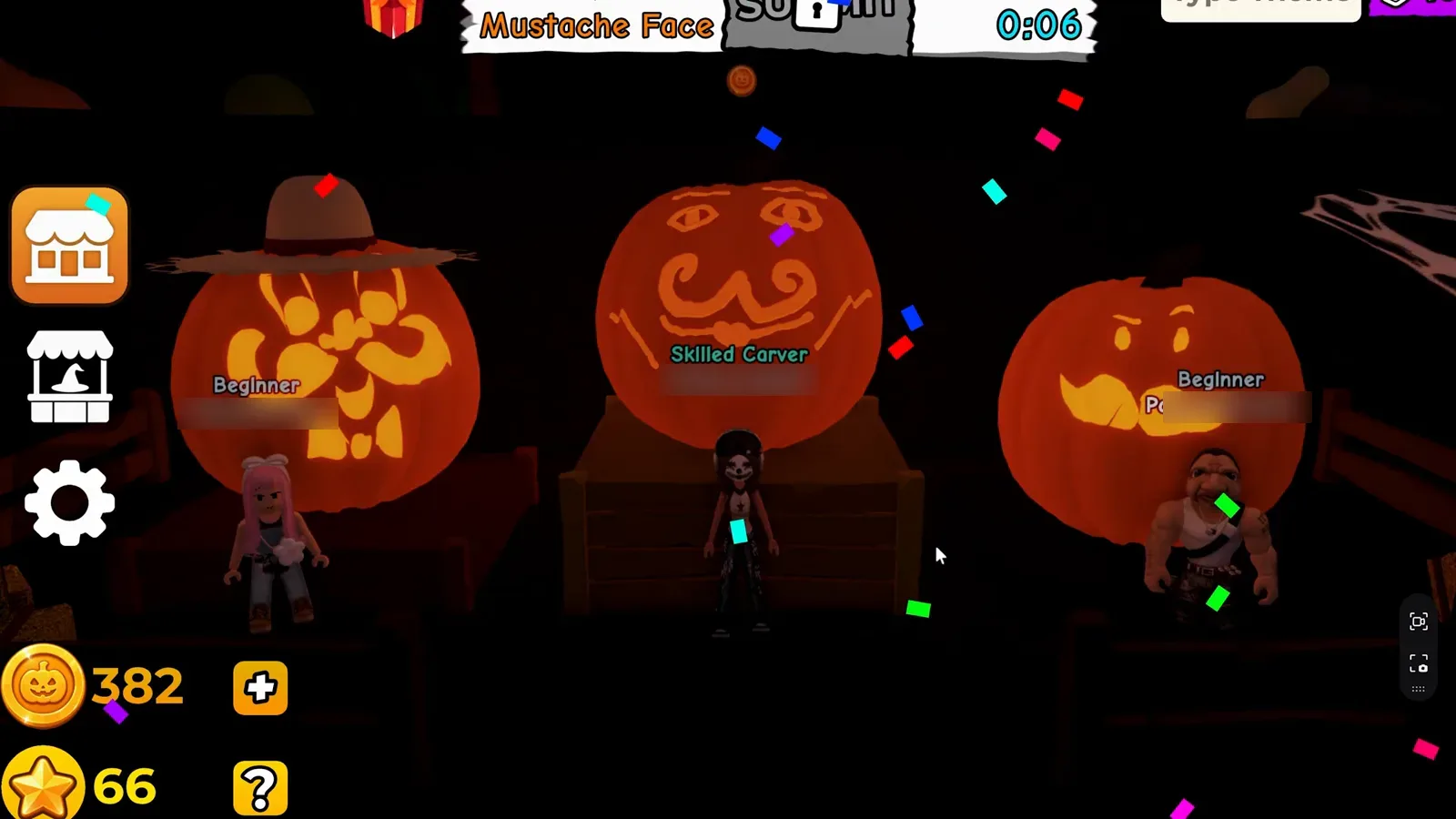
Winners stage from Andre se hace Gamer’s video: timer 0:06, three podiums, usernames blurred. The Winners: label is cropped off the top.
The Player Scores board follows under the label Scores:. It lists #1, #2, #3… with an avatar, a name and a star icon with a numeric total. Two things stand out:
- Ranks run in sequence even when totals tie. The Mustache Face board has #1 and #2 both at 18. In the Pirate round the top three were all at 15. In the Fire round #2 and #3 were both at 20, and in the Devil round the top three were all at 22. How the game orders tied rows is not yet verified.
- The podium and the board do not line up. In the Mustache Face round only one of the three podium names also appears among the seven board rows (the recording player, #2); the other two, including the center spot, are not on the board at all. In KawaiiCreeper’s Eyes round, none of the three podium names appear among the six board rows. We do not know why, so how the podium is chosen is not yet verified.
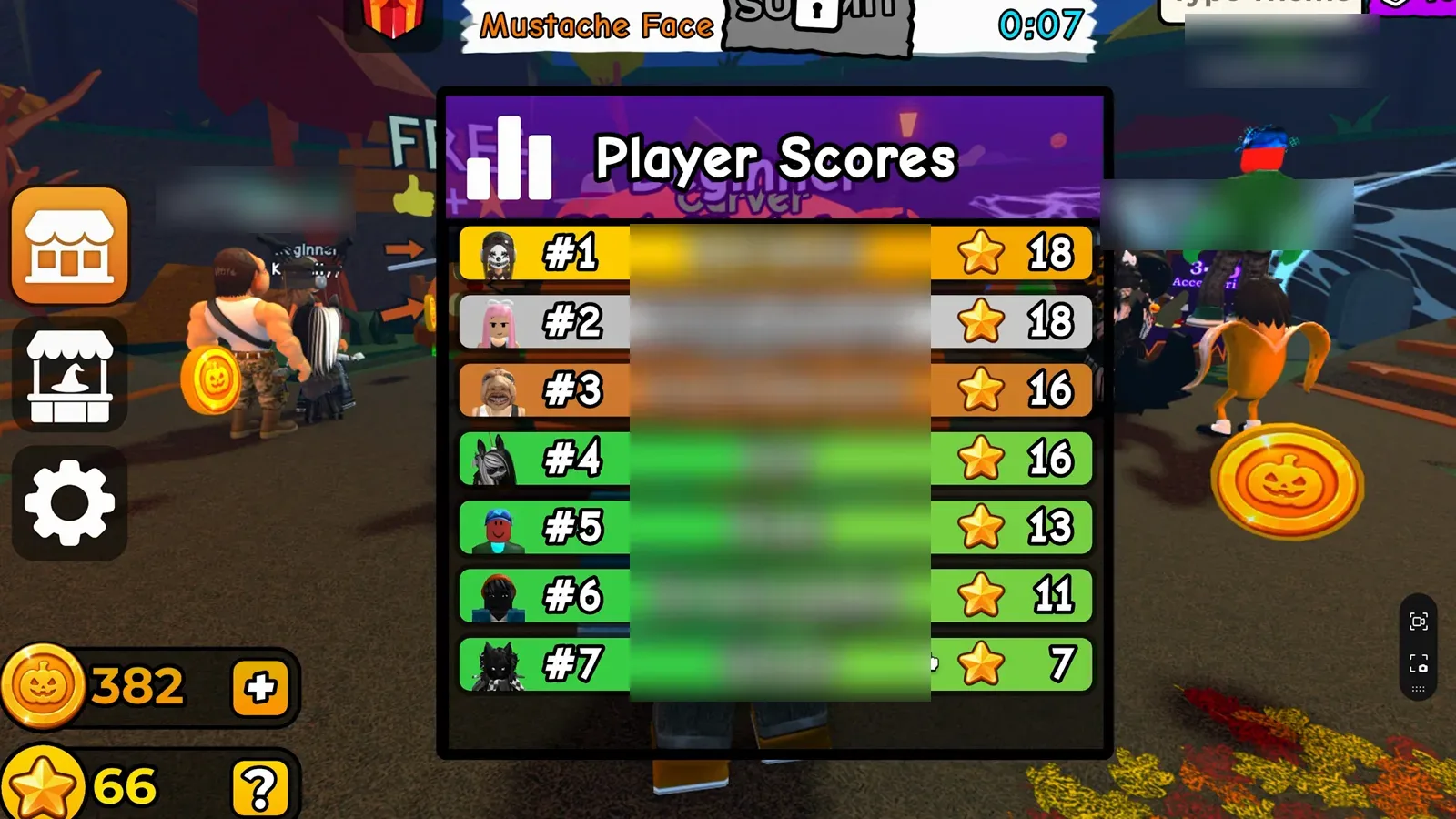
Player Scores after the Mustache Face round: #1 and #2 both at 18, then 16, 16, 13, 11 and 7. Names are blurred; the HUD shows 382 Coins / 66 Stars.
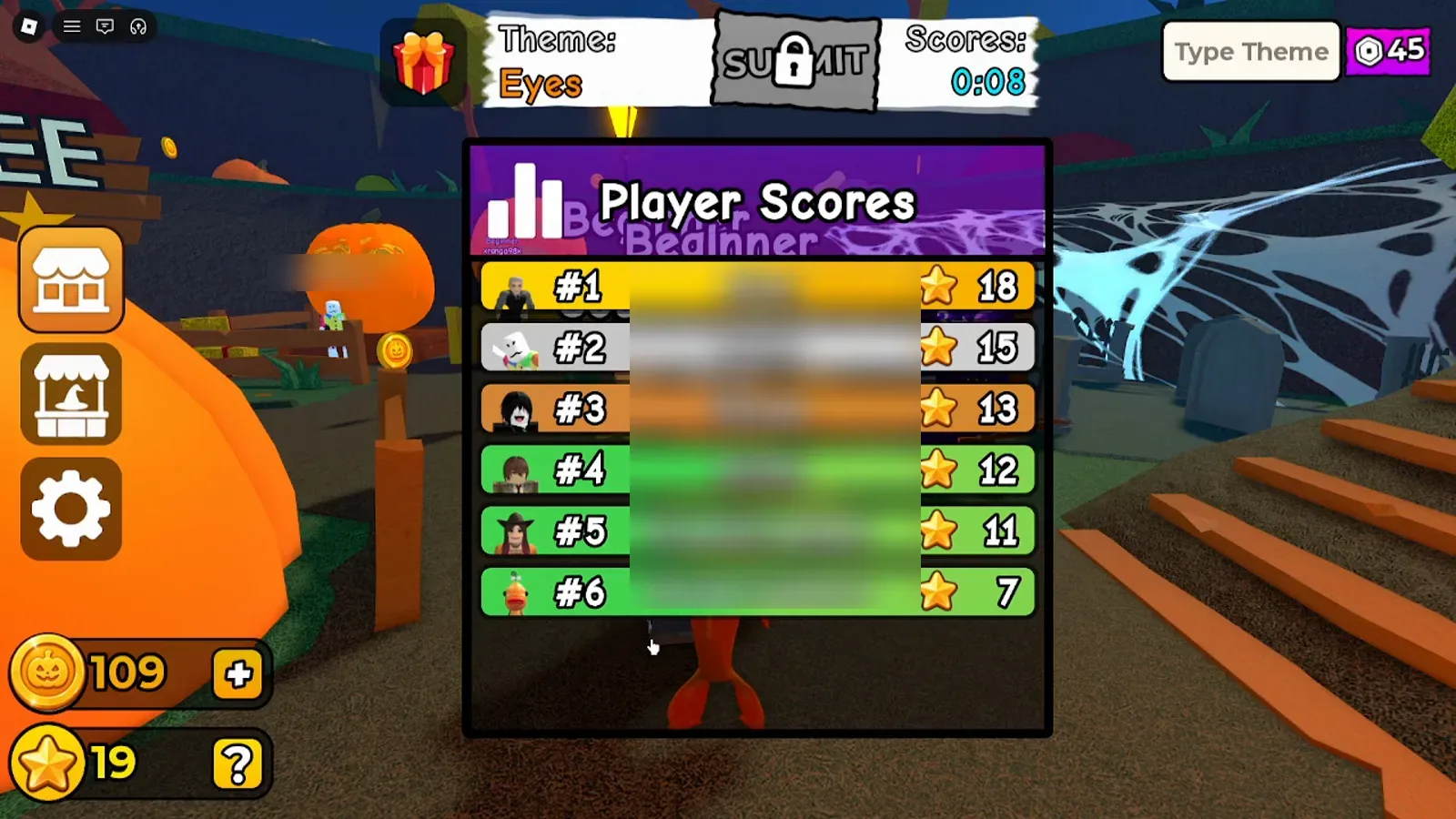
KawaiiCreeper’s Eyes round: the Scores: label reads 0:08. The six rows read 18, 15, 13, 12, 11 and 7; the recording player is #5 with 11, and the HUD Stars counter went from 8 to 19.
What does your Player Scores number do to your Stars?
In every round where we could read both the board and the recording player’s Stars counter, the counter rose by exactly the number on that player’s row: 14, 18, 18, 15, 20 and 18 across six rounds in Andre’s video, and 11 and 15 in two rounds of KawaiiCreeper’s. The Mustache Face board above fits it: the player’s row reads 18 and the Stars counter went from 48 to 66. The full table, plus how Coins changed by rank, is on the coins, stars and shop guide. How the board number is calculated from the star clicks is not yet verified.
Can you rate your own pumpkin?
The client lets you interact with reaction icons while your own pumpkin is on stage. Andre’s narrator says “I appeared first” and “I’m going to give myself a happy face, even if it’s just me. Nobody is giving me any smiley faces,” and later that he “gave myself those thumbs up.” He also says he kept “forgetting to add stars.” None of that proves whether star clicks on your own pumpkin are allowed, or whether they count. Whether self-ratings count in the final Player Scores math is not yet verified.
What did the player in the video notice?
These lines come from Andre se hace Gamer’s auto-translated English subtitles (2026-10-10). They are experience notes, not rules:
- His own pumpkin came first in the voting order in at least one round, and he gave it a happy-face reaction.
- He said he kept forgetting to add stars while using the reaction icons.
- He rated rivals lower “because it’s competition” while admitting a pumpkin deserved more.
- After a three-way tie in the Pirate round, he said “although we all tied, I finally won first place,” which matches the board where his row is listed #1 at 15.
If your subtitles differ, trust the on-screen timers and star row first.
How can you win more votes in Carve a Pumpkin?
These are editor tips, separate from verified mechanics:
- Finish before the Round timer hits zero so viewers see a complete silhouette; use how to play for the official three-minute carve promise and themes for how theme prompts show up in the HUD.
- During Voting, tap the star row deliberately. The recorder’s “forgetting to add stars” is easy to do when you focus on the reaction icons, and each pumpkin is on stage for only a few seconds.
- Make the theme readable at a glance; the dark voting stage hides fine detail.
- Stay for the lobby coin scatter after the board; stack rewards with the coins, stars, and shop guide.
What happens after results?
Once Player Scores closes, the HUD switches to Intermission: and avatars return to the outdoor lobby. We saw gold coin pickups on the grass, sometimes with a +1 floater, while the countdown runs toward the next theme. Star and Coin balances in the corner change between rounds, but exact earn rates are not yet verified; see coins, stars, and shop for the readings we did make.
For carve controls and theme text, start at how to play and the beginner guide; developer and rating context is on the game info page. If you landed from another Roblox “carve a pumpkin” title, read which Carve a Pumpkin? first.
Where do these observations come from?
| Source | Video ID | Uploaded | Language | How we used it |
|---|---|---|---|---|
| Andre se hace Gamer | WRXWjjoXVlo | 2026-10-10 | Spanish audio; auto-translated English subtitles (treated as clues, checked against frames) | Player Scores boards, voting frames, narrator remarks |
| KawaiiCreeper | gw8giYWu3Ss | 2026-10-11 | English audio; no reliable captions | HUD labels and timers for every phase, extra boards |
Screenshots are illustrative frames from those recordings with other players’ usernames blurred; prose is original to carveapumpkinguide.wiki. We have not independently played the live game to confirm every detail, and both uploads contain jump cuts.

Carve a Pumpkin! gameplay with voting and results (Andre se hace Gamer)
What is still not verified?
| Topic | Status |
|---|---|
| Five-star row + four-icon reaction column exist in voting UI | Verified · Checked 2026-10-12 |
HUD labels Round: → Voting: → Winners: → Scores: → Intermission: |
Verified · Checked 2026-10-12 |
| Three-pumpkin Winners podium + Player Scores board | Verified · Checked 2026-10-12 |
| Star totals can tie on Player Scores | Verified · Checked 2026-10-12 |
| Stars counter rises by your row’s number (8 of 8 readable rounds) | Verified · Checked 2026-10-12 |
| How the board number is calculated (stars vs reactions, averages, self-votes) | Not yet verified |
| How the podium is chosen (it did not match the board) | Not yet verified |
| Fixed seconds per pumpkin / full-round voting duration | Not yet verified |
| Coin payout per rank | Not yet verified |
Related Articles
guides
Carve a Pumpkin Roblox Coins, Stars and Shop: What We Saw
Carve a Pumpkin Roblox Coins and Stars from real rounds: results-screen payouts by place, Pumpkin Shop prices, Playtime Rewards and title labels, with limits.
guides
Carve a Pumpkin Roblox Themes: Prompts Seen in Real Rounds
See Carve a Pumpkin Roblox themes from real gameplay footage: HUD labels, timers, and how players carved Nightmare, Pirate, Weather and more (pool size unverified).
codes
Carve a Pumpkin! Codes: None Verified (Oct 2026)
As of Oct 2026 there are no verified Carve a Pumpkin! Roblox codes. Learn why old simulator lists fail and how to check new claims safely.
Was this helpful?
Thanks for the feedback!